Cashier Instructions
1. Order Placement module下单模块
1.1 Ordering点单
1.1.1 Cash register ordering-packing 收银台点单-打包
1.1.2 Cash register - dine-in service 收银台-堂食
1.1.3 Ordering through a QR code for meal orders 点餐码点餐
1.1.4 Cashier - Self-service Ordering 收银台-自助点单
1.1.5 Independent table layout 独立桌码
1.1.6 Dynamic QR Code 动态桌码
1.2 How to Pending Orderr/Retrieve Order 如何挂单/取单
1.3 discount area 折扣区
1.3.1 Single product discount/price adjustment 单商品折扣/改价
⭐1.3.2 Add discount 减价抹零
1.3.3 NO GST 整单免GST
1.3.4 Erase Service Charge 抹去服务费
1.4 Remarks 备注
1.4.1 Remarks for individual products 单商品备注
1.4.2 Notes on the entire order 整单备注
1.4.3 Edit Notes 编辑备注
1.5 Cancel All 整单取消
1.6 Cash box 手动开启钱箱
1.7 Split Tables/Merge Tables/Transfer Table 拆桌/合桌/转台
1.7.1 Split Tables 拆桌
1.7.2 Merge Tables 合桌
1.7.3 Transfer Table 转台
1.8 Payment 支付
1.8.1 General Payments 普通支付
1.8.2 Member Payments 会员支付
1.9 View Adjustments 视图调整
1.9.1 Modify the size of the category column 修改分类栏的尺寸
1.9.2 Product display with or without pictures 商品展示有图无图
1.9.3 Product sorting 商品排序
⭐1.10 Modify the Dish Name/Price/Edit 修改商品名称/价格/库存
1.10.1 Modify Name/Price 修改名称/价格
1.10.2 Modify the Edit修改商品库存
1.11 Open item
1.12 Receipt Printing Confirmation 收银小票打印确认
2. Membership 会员
2.1 Member creation and login 会员创建和登录
⭐2.2 View membership base information 查看会员基础信息
2.3 Member Recharge 会员充值
2.4 View member usage records 查看会员使用记录
⭐2.5 Issuance/use of membership coupons 会员优惠卷的发放/使用
3. KDS
3.1 How to Select Kitchen 如何切换厨房
3.2 Find orders quickly 快速查找订单
3.3 Complete the production of the order product 完成订单商品制作
3.4 Withdraw an order for pickup 撤回待取餐的订单
3.5 View the details of the order to be picked up 查看待取餐订单详情
3.6 Entering the Order 输入订单
3.6.1 Edit Shortcuts 编辑快捷方式
3.7 Pick up meals 取餐
3.8 Withdraw an order that has already been picked up 撤回已取餐的订单
4. Orders and reports 订单和报表
4.1 Orders 订单
⭐4.1.1 Inquiry Order 查询订单
4.1.2 Sending to the mailbox 发送到邮箱
⭐4.1.3 Modify the payment method 修改支付方式
4.1.4 Modify the order price 修改订单价格
4.1.5 Print Kitchen Order/Print Bill 再次厨打/打印小票
⭐4.1.6 Refunds 退款
4.1.7 Return to dine in 返回桌台
4.1.8 Cancel order 取消订单
4.2 Reports 报表
4.2.1 Daily Report 日结单
4.2.2 Hourly Sales Report 小时销售报表
4.2.3 Multi Day Report 选择多天查询
4.2.4 Member Marketing Report 会员营销报表
4.2.5 Cash box manual open record 钱箱手动开启记录
4.2.6 Business/shift data 营业/班次数据
4.2.7 View reports for non-current days 查看非当天的报表
4.2.8 Printing Reports 打印报表
5. Inventory 库存管理
6. Cash Manage 现金管理
6.1 Manually add income 手动添加收入
6.2 Manually add expenditure 手动添加支出
6.3 View historical settlement records 查看历史清算记录
6.4 How to liquidate 如何清算
6.5 Increase the reserve fund 增加备用金
7. Deposit and Queue 押金和排队
7.1 Deposit 押金
7.1.1 How to deposit 怎么记录押金
7.1.2 How to view/modify the deposit 怎么查看/修改押金
7.1.3 How to use the deposit 如何使用押金
7.2 Queue 排队
⭐common problem 常见问题
Adjust consumption points 调整消费积分
How to modify consumption points 如何修改消费积分
How can members add points after their first purchase and registration 会员首次消费后注册,如何添加积分
SMS top-up 短信充值
Ajuste de Idoma 调整语言
Cash register white screen 收银机白屏
he IP address of the cash register and the card machine is the same 收银台和刷卡机IP 地址一致
Exit the screen dominance mode 退出霸屏模式
Manually add member 收银台手动添加会员
How to use Open item 如何使用Open item
Receipt calculation 小票计算
Custom table Settings 自定义桌台设置
How to arrange the table 如何摆放桌子
How to add regional text 如何添加区域文字
How to delete content 如何删除内容
Coupon difference 优惠券
PR use PR使用
Order association PR 订单关联PR
Order cancellation/modification PR 订单取消/修改PR
Difference between Takeaway & Virtual Table 打包&虚拟桌台的区别
Printer Failure Emergency Plan 打印机无法打印应急方案
Prevent Malicious Orders 防止顾客恶意下单
Refund Operation Guide 退款操作指南
Mall Voucher Payment Guide 商场券付款操作指南
-
+
首页
Prevent Malicious Orders 防止顾客恶意下单
<style> .wiki-cover{padding:34px 38px;margin-bottom:24px;background:linear-gradient(135deg,#16324f,#2563a6);color:#fff;border-radius:12px} .wiki-cover h1{margin:0 0 10px;font-size:30px;border:0;color:#fff} .wiki-cover p{margin:4px 0;color:#eaf2fb} .wiki-summary{padding:18px 22px;margin:18px 0;background:#f4f7fa;border-left:6px solid #78909c;color:#26384a} .wiki-success{padding:16px 20px;margin:16px 0;background:#eef9f1;border-left:6px solid #38a169;color:#234e32} .wiki-warning{padding:16px 20px;margin:16px 0;background:#fff8e8;border-left:6px solid #e6a23c;color:#664d03} .wiki-danger{padding:16px 20px;margin:16px 0;background:#fff1f0;border-left:6px solid #e55353;color:#7f1d1d} .wiki-path{padding:12px 16px;margin:12px 0;background:#f6f8fa;border:1px solid #d8dee4;border-radius:6px;font-family:Menlo,Monaco,Consolas,monospace;color:#1f2937} .wiki-caption{text-align:center;color:#6b7280;font-size:13px;margin-top:6px} .wiki-tag{display:inline-block;padding:3px 9px;margin-right:6px;border-radius:12px;background:#e8f1ff;color:#1769aa;font-size:13px} table{width:100%;border-collapse:collapse;margin:16px 0} th{background:#edf3f8;color:#26384a} th,td{padding:11px 12px;border:1px solid #dce3e9;text-align:left;vertical-align:top} h2{margin-top:34px;padding-bottom:8px;border-bottom:2px solid #d9e7f5;color:#173b5e} h3{margin-top:25px;color:#245780} </style> <div class="wiki-summary"> <strong>Purpose</strong><br> This document explains two risks: customers reusing saved table QR codes outside the store, and customers editing submitted orders after a kitchen ticket has been printed. It introduces the available controls and helps stores select the appropriate solution based on their service process and kitchen-printing rules.<br><br> <strong>文档目的</strong><br> 本文说明顾客留存桌码在店外继续下单,以及提交订单后返回修改商品所带来的风险,并介绍对应的控制方式,帮助门店根据服务流程和厨房出单规则选择合适的方案。 </div> ## 1. Background|问题背景 A customer may take a photo of a table QR code while dining in the store and retain it after leaving. The saved QR code can then be used repeatedly to place orders, causing abnormal orders to enter the store or kitchen and disrupting normal operations. 顾客可能在店内用餐时拍照保存桌码,离店后继续使用该桌码反复下单,导致异常订单进入门店或厨房,影响门店正常运营。 <div class="wiki-danger"> <strong>Core Risk|核心风险</strong><br> The issue cannot be completely eliminated by changing the table QR-code format alone. As long as an unpaid H5 order can be sent directly to the kitchen, malicious ordering and unnecessary food preparation remain possible.<br><br> 仅调整桌码形式很难彻底解决问题。只要未支付的 H5 订单可以直接推送厨房,就始终存在恶意下单及误出品风险。 </div> ## 2. Another Risk: Editing a Submitted Order|另一类风险:修改已提交订单 For stores where an order is sent to the kitchen before counter payment, customers may return to the order page after submitting an order and change the quantity of an existing item or add more items. Since the original kitchen ticket has already been printed, the kitchen may be unable to determine whether to follow the original quantity, the revised quantity, or treat the later submission as an additional order. 对于提交订单后先出厨房小票、再到收银台付款的门店,顾客提交订单后可能返回订单页面,修改原商品数量或增加商品。由于原厨房小票已经打印,厨房可能无法判断应该按照原数量、修改后的数量制作,还是将后续内容作为加菜处理。 <div class="wiki-danger"> <strong>Operational Risk|运营风险</strong><br> Allowing customers to edit submitted items after a kitchen ticket has been printed may cause missed items, duplicate preparation, or incorrect quantities.<br><br> 厨房小票打印后仍允许顾客修改已提交商品,可能造成漏做、重复制作或制作数量错误。 </div> ## 3. Available Solutions|可选方案 | Solution|方案 | Primary purpose|主要作用 | Best suited for|适用门店 | Main limitation|主要限制 | |---|---|---|---| | Dynamic Code|动态桌码 | Prevent retained QR codes from being reused|防止留存桌码继续使用 | Stores with table-side service|具备桌边服务流程的门店 | Requires staff to print and deliver a code for each table|需要员工逐桌打印和发放 | | Separate Code|独立桌码 | Isolate orders by creating sub-tables|通过子桌台隔离订单 | Most stores using individual ordering|大部分采用个人点餐的门店 | Malicious orders may still reach the kitchen|恶意订单仍可能进入厨房 | | Cashier Review|收银复核 | Require manual approval before kitchen printing|厨打前人工确认 | Stores able to review every H5 order|能够逐单审核的门店 | Increases labor and may slow operations|增加人力和操作时间 | | Traditional Chinese Restaurant Mode|传统中餐厅模式 | Prevent submitted items from being changed|禁止修改已提交商品 | Stores that submit first and pay at the counter|先提交订单、后到收银台付款的门店 | Must also disable item editing after returning from the payment page|必须同时禁止支付页返回后修改菜品 | | Send After Payment|支付后推送厨房 | Prevent unpaid orders from triggering kitchen printing|防止未支付订单触发厨打 | Recommended whenever operationally possible|条件允许时优先采用 | Requires the store's ordering process to support payment-first handling|需要门店支持先支付后制作 | ## 4. Dynamic Code|动态桌码 ### 4.1 Applicable Scenario|适用场景 Dynamic Code is more suitable for premium or full-service restaurants that already use a one-table-one-code service model. After customers are seated, the cashier or service staff provides a printed ordering booklet or card containing a temporary QR code. 动态桌码更适合高级餐厅或服务型餐厅。这类门店本身采用一桌一码的服务模式,客人入座后,由收银员或服务人员递送带临时二维码的点单小本子或卡片。 The store should have an established table-side service process and be able to absorb the additional work of printing and distributing QR codes. 门店需要具备相应的桌边服务流程,并能够承担打印、发放桌码带来的操作成本。 ### 4.2 How It Works|工作原理 1. **Print a QR code for the current table|为当前桌台打印二维码** The store does not permanently display a fixed QR code on the table. Staff prints a Dynamic Code after the customer is seated. 桌面不长期粘贴固定桌码,顾客入座后由员工打印本次就餐使用的动态桌码。 2. **Use the code during the current visit|本次就餐期间扫码下单** Customers scan the temporary QR code to place orders. 顾客扫描临时二维码完成本次就餐下单。 3. **Invalidate the code|二维码失效** If an expiration period is enabled, the code expires automatically after the configured time, calculated from the printing time. If no expiration period is enabled, the code becomes invalid after payment is completed or the table is cleared. 开启有效期后,系统从打印时间开始计时,超过设定时间自动失效;未开启有效期时,订单支付完成或清台后立即失效。 4. **Print a new code for the next party|下一桌重新打印** A new QR code must be printed for the next group of customers. A photo of the previous code can no longer be used. 下一桌顾客需要重新打印二维码,上一桌顾客保存的二维码照片无法继续使用。 <div class="wiki-success"> <strong>Protection Effect|防护效果</strong><br> Dynamic Code prevents an old table QR code from being reused and is the preferred option for stores that have already experienced malicious ordering or face a high level of risk.<br><br> 动态桌码可以阻止旧桌码被重复使用。对于已经发生恶意扫码或风险较高的门店,这是优先推荐的桌码方案。 </div> ### 4.3 Configuration|配置方式 <div class="wiki-path">Store → Table QR Code Management → Table QR Code Settings<br>门店 → 桌码管理 → 桌码设置</div> 1. Open **Table QR Code Settings|桌码设置**. 进入“桌码设置”。 2. Set **Enable Dynamic Code|是否开启动态码** to **Enable|开启**. 将“是否开启动态码”设置为“开启”。 3. If required, enable **Dynamic Code Validity Period|动态桌码有效期** and configure the expiration time. 如需限制使用时间,开启“动态桌码有效期”并设置失效时间。 4. Restart the cashier terminal for the new configuration to take effect. 切换配置后,需要重启收银台才能生效。 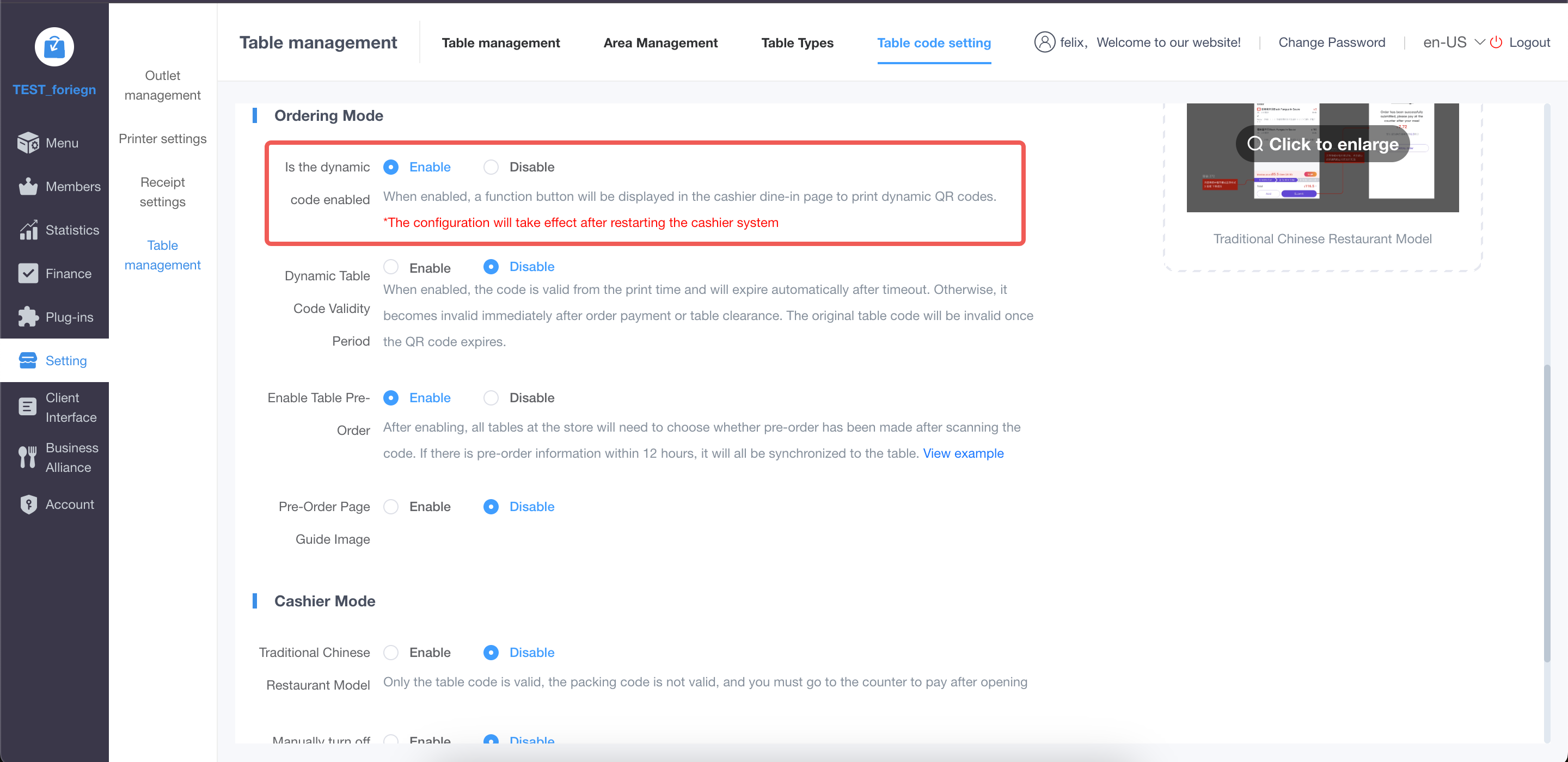 <div class="wiki-caption">Figure 3. Enable Dynamic Code and configure its validity period|图 3:开启动态码并配置有效期</div> <div class="wiki-warning"> <strong>Operational Cost|操作成本</strong><br> Staff must print and deliver a QR code for each table. Stores without an appropriate service process may find this difficult to maintain during busy periods.<br><br> 员工需要为每桌打印并发放二维码。缺少相应服务流程的门店,在高峰期可能难以持续执行。 </div> ## 5. Separate Code|独立桌码(子桌台形式) ### 5.1 Applicable Scenario|适用场景 Separate Code can be used by most stores that want to prevent one customer's cart or order from interfering with another customer's dining session. 独立桌码适用于大部分希望隔离不同顾客购物车和订单的门店。 When different devices or browsers scan the same table QR code, the system creates separate sub-tables such as `A2_1`, `A2_2`, and `A2_3`. If the same phone continues to use the same browser without clearing its cache, it remains on the original sub-table. Clearing the cache, changing the browser, or using another phone creates a new sub-table. 不同手机或浏览器扫描同一个桌码时,系统会分别创建 `A2_1`、`A2_2`、`A2_3` 等子桌台。同一手机未清除浏览器缓存时,会继续使用原子桌台;清除缓存、更换浏览器或更换手机后,会创建新的子桌台。 ```text A2 Table QR Code|A2 桌码 ├── Customer 1 → A2_1|顾客 1 → A2_1 ├── Customer 2 → A2_2|顾客 2 → A2_2 └── Customer 3 → A2_3|顾客 3 → A2_3 ``` ### 5.2 Stores Where It Is Not Recommended|不适合的门店 #### A. Shared-table Chinese restaurants|多人共桌的中餐厅 In a group dining scenario, people at the same table often expect to share one order. Separate Code creates an individual sub-table and order for each customer, which does not match the usual group-ordering behavior. 多人聚餐时,同桌人员通常需要共同使用一个订单。独立桌码会为每位扫码顾客创建不同的子桌台和订单,不符合多人共桌的点餐习惯。 #### B. Stores that print to the kitchen before payment|未支付即直接厨打的门店 Separate Code isolates the orders but does not verify whether the customer is physically present. If every submitted order is sent directly to the kitchen without checking payment status, an external malicious order may still trigger kitchen printing and food preparation. 独立桌码只能隔离订单,无法判断扫码者是否真实在店。如果门店不校验付款状态、下单后直接推送厨房,外部恶意订单仍会触发厨打和制作。 <div class="wiki-danger"> <strong>Important Limitation|重要限制</strong><br> Separate Code protects the current customer's ordering session, but it does not stop a malicious order from being created or sent to the kitchen.<br><br> 独立桌码可以保护当前顾客的点餐过程不被干扰,但不能阻止恶意订单被创建或进入厨房。 </div> ### 5.3 Configuration|配置方式 <div class="wiki-path">Store → Table QR Code Management → Area Management<br>门店 → 桌码管理 → 区域管理</div> 1. Open **Area Management|区域管理**. 进入“区域管理”。 2. Locate the area that requires Separate Code mode. 找到需要启用独立桌码的区域。 3. Change **Ordering Mode|点餐模式** from **Unified|统一** to **Separate|独立**. 将“点餐模式”从“统一”切换为“独立”。 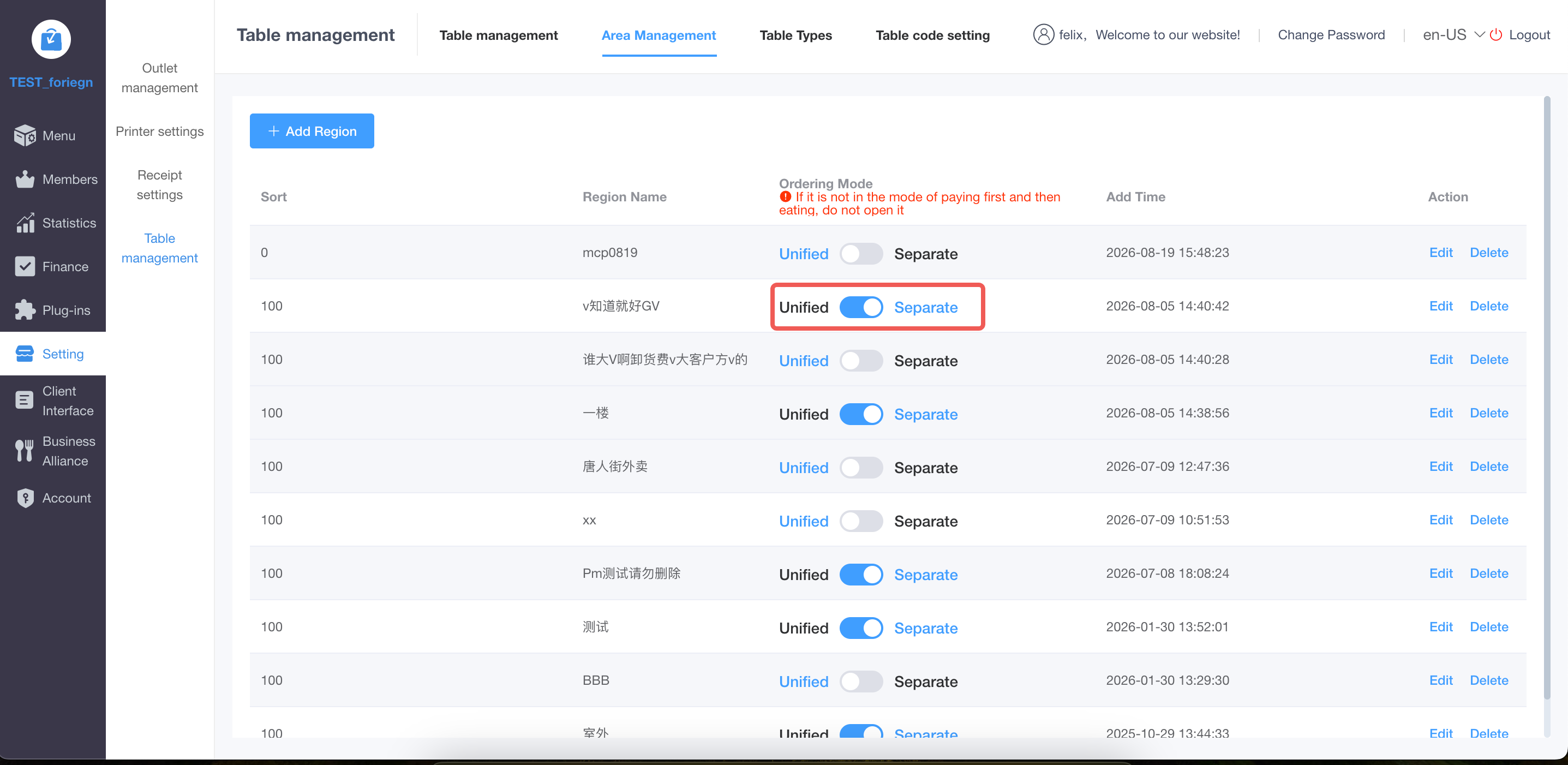 <div class="wiki-caption">Figure 4. Change the ordering mode of an area to Separate|图 4:将区域点餐模式切换为“独立”</div> ## 6. Cashier Review|收银复核 ### 6.1 How It Works|工作原理 After Cashier Review is enabled, all products ordered through H5 must be manually confirmed at the cashier terminal before they are sent to the kitchen. 开启收银复核后,所有通过 H5 下单的商品都需要经过收银台人工确认,确认后才会进入厨房。 ```text H5 order|H5 下单 ↓ Cashier review|收银台人工复核 ↓ Approved|确认通过 Send to kitchen|推送厨房 ``` This allows staff to identify and reject obvious abnormal orders before kitchen production begins. 该方式允许员工在厨房开始制作前识别并拦截明显的异常订单。 ### 6.2 Configuration|配置方式 <div class="wiki-path">Plugins → Cashier → Basic Settings<br>插件 → 收银台 → 基础设置</div> 1. Open **Basic Settings|基础设置** under the Cashier plugin. 进入收银台插件的“基础设置”。 2. Locate **Enable “Cashier Review” at the cashier terminal|是否在收银台开启“收银复核”**. 找到“是否在收银台开启‘收银复核’”。 3. Select **Yes|是**, and then submit the settings. 选择“是”,然后提交设置。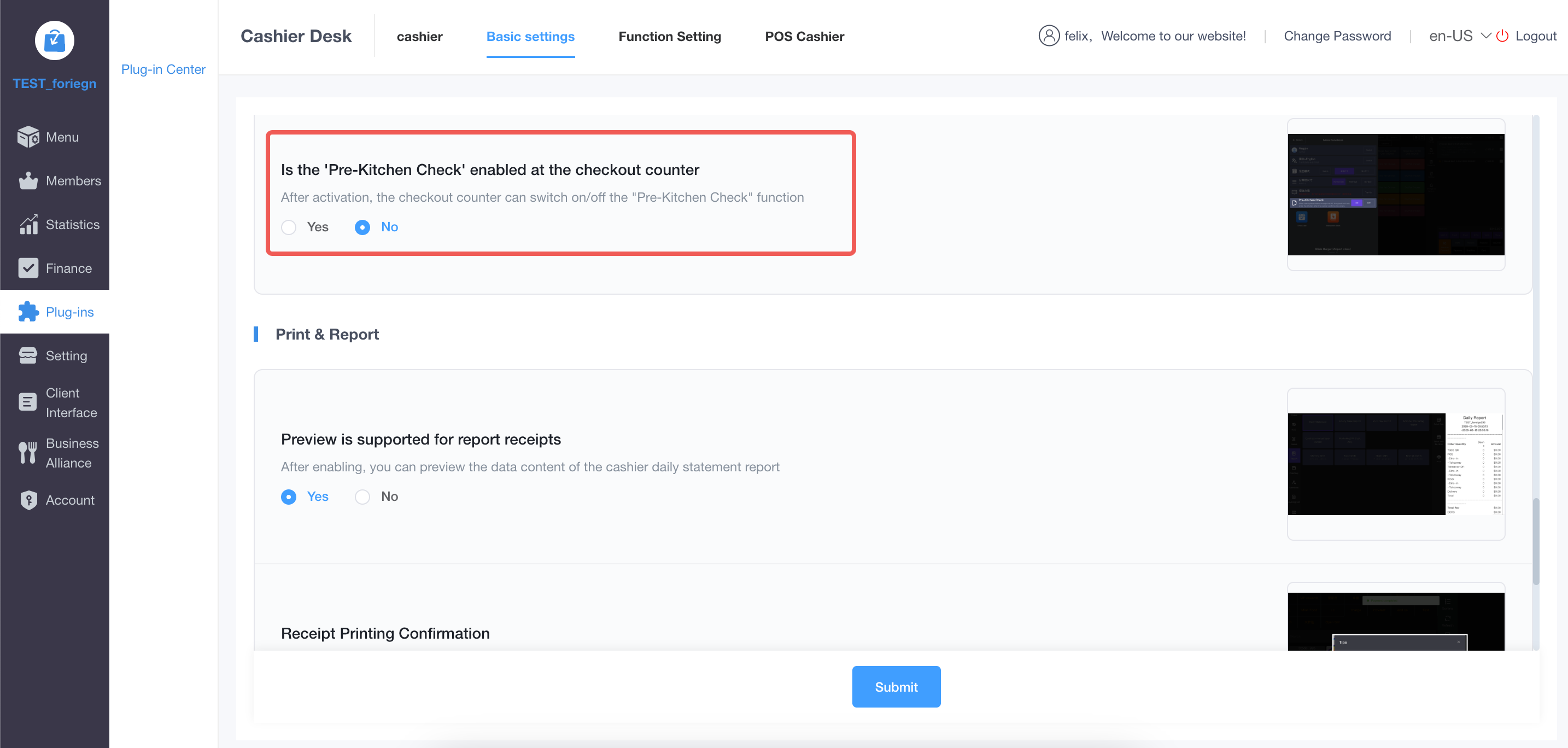 <div class="wiki-caption">Figure 5. Enable Cashier Review in Basic Settings|图 5:在基础设置中开启收银复核</div> <div class="wiki-warning"> <strong>Operational Limitation|操作限制</strong><br> Every H5 order requires manual confirmation. This increases workload and may delay order processing during busy periods. Stores with insufficient staffing may find it difficult to implement consistently.<br><br> 所有 H5 订单都需要人工确认,会增加员工工作量,高峰期还可能延迟出单。人手不足的门店较难长期稳定执行。 </div> ## 7. Traditional Chinese Restaurant Mode|传统中餐厅模式 ### 7.1 Applicable Scenario|适用场景 This setup is intended for stores where customers submit an order first and complete payment at the cashier. It addresses the risk of customers returning to change items after the original kitchen ticket has already been printed. 该设置适用于顾客先提交订单、之后再到收银台付款的门店,用于解决原厨房小票已经打印后,顾客返回修改商品所造成的出品混乱。 ### 7.2 Required Settings|必要设置 Both settings below must be configured together. 以下两项设置需要配合使用。 #### A. Enable Traditional Chinese Restaurant Mode|开启传统中餐厅模式 <div class="wiki-path">Store → Table QR Code Management → Table QR Code Settings → Traditional Chinese Restaurant Mode<br>门店 → 桌码管理 → 桌码设置 → 传统中餐厅模式</div> After this mode is enabled, customers skip the payment-method selection and additional order-confirmation steps. Once the order is confirmed, the page directly displays **Submitted Successfully|已成功提交**. 开启后,顾客确认订单时会跳过选择支付方式和再次确认下单的流程,直接进入“已成功提交”页面。 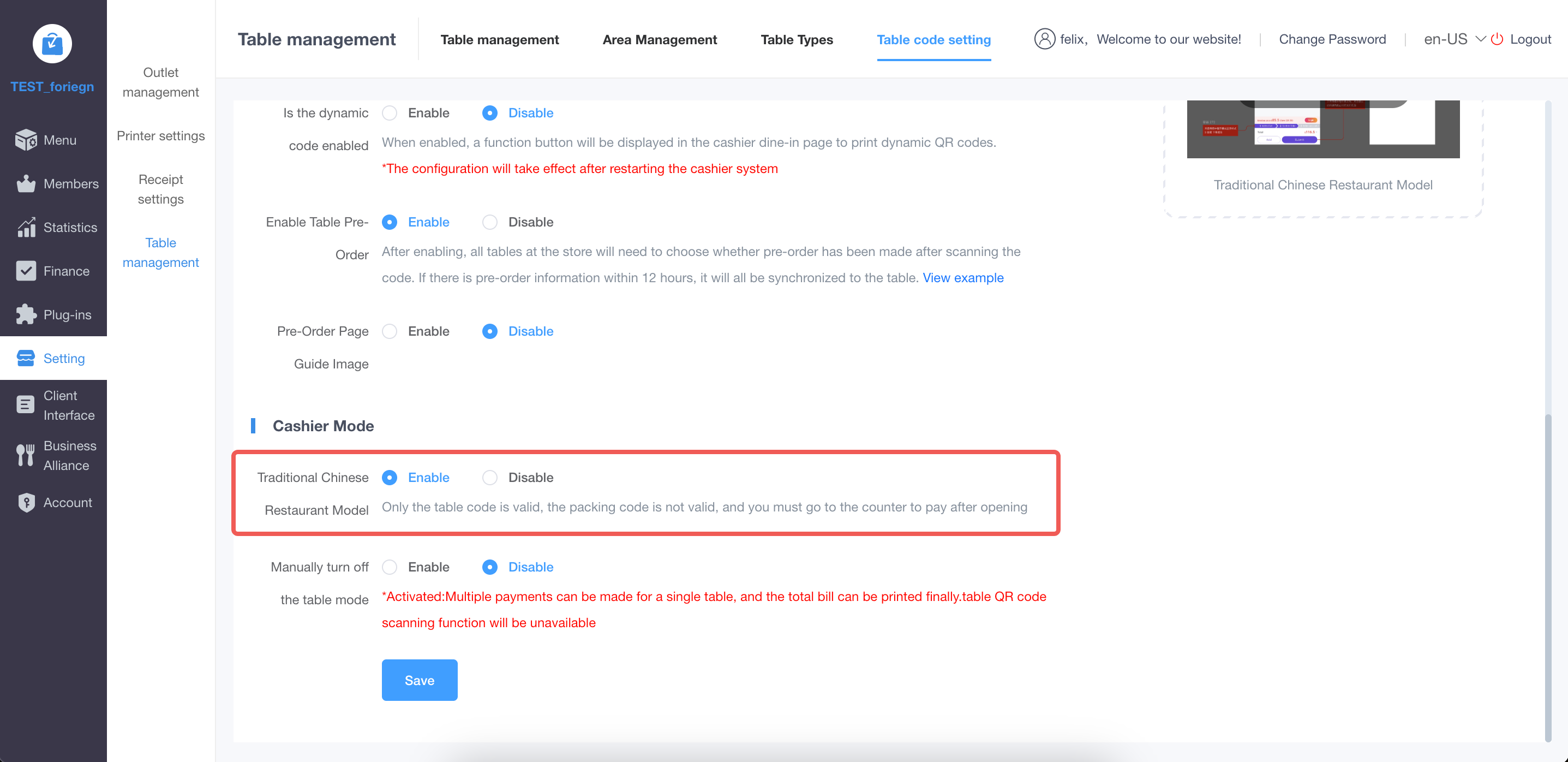 <div class="wiki-caption">Figure 6. Enable Traditional Chinese Restaurant Mode|图 6:开启传统中餐厅模式</div> #### B. Disable Editing After Returning from the Payment Page|禁止支付页返回后修改菜品 <div class="wiki-path">Store → Store Management → Settings → Transaction Settings → Dish Editing Permission After Returning from Payment Page<br>门店 → 门店管理 → 设置 → 交易设置 → 支付页返回后菜品修改权限</div> Set **Dish Editing Permission After Returning from Payment Page|支付页返回后菜品修改权限** to **Not Allowed|不允许**. This prevents customers from changing the quantity or details of items that have already been submitted. 将“支付页返回后菜品修改权限”设置为“不允许”,防止顾客返回后修改已经提交的商品数量或内容。 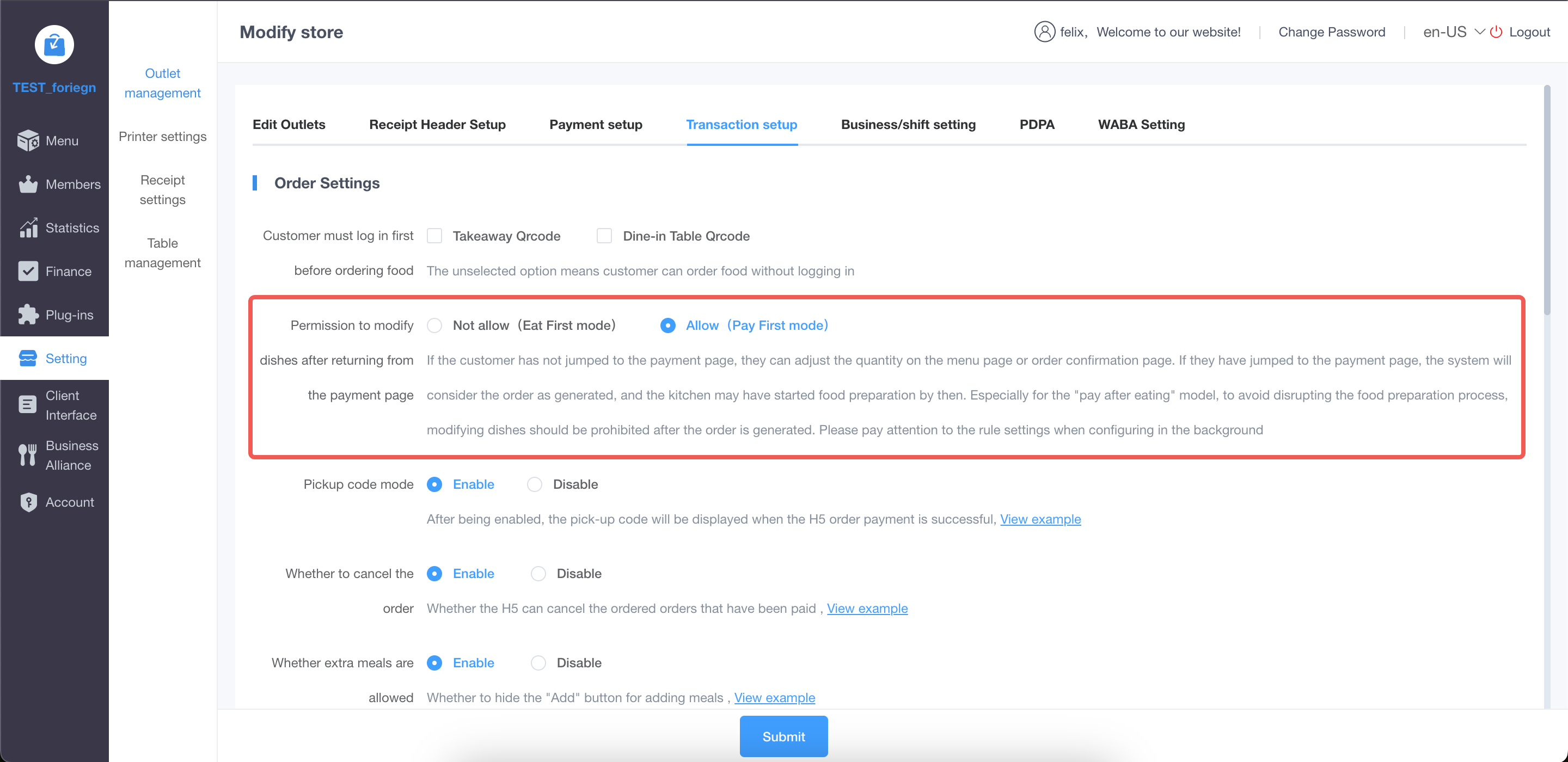 <div class="wiki-caption">Figure 7. Disable editing of submitted items|图 7:禁止修改已提交商品</div> ### 7.3 Adding More Items|继续加菜 After the settings are applied, submitted items cannot be edited. Customers can still select **Add More Items|添加更多菜品** to place an additional order. 完成设置后,顾客不能修改已经提交的商品,但仍可以通过“添加更多菜品”继续加菜。 - A new kitchen ticket is printed for the additional items. 加菜商品会生成一张新的厨房小票。 - In KDS, the additional items are added to the original order. 在 KDS 中,加菜商品会增加到原订单内。 - The kitchen only needs to prepare the newly added items and does not need to reinterpret the original ticket. 厨房只需处理新增商品,无需重新判断原小票中的商品数量。 <div class="wiki-success"> <strong>Expected Result|预期效果</strong><br> The original submitted order remains unchanged, while additional items are clearly recorded as a new addition. This reduces missed items, duplicate preparation, and quantity disputes in the kitchen.<br><br> 原订单保持不变,加菜内容会被清晰记录为新增商品,从而减少厨房漏做、重复制作和数量判断错误。 </div> ## 8. Send Orders to the Kitchen After Payment|支付完成后再推送厨房 The most effective operational control is to send an order to the kitchen only after payment has been completed. An external user may still scan a retained QR code and create an order, but an unpaid order will not trigger kitchen printing or food preparation. 最有效的运营控制方式,是仅在订单支付完成后再推送厨房。即使外部人员使用留存桌码创建了订单,未支付订单也不会触发厨打和商品制作。 <div class="wiki-success"> <strong>Recommended Practice|最优建议</strong><br> Whenever the store's operating process allows it, use “payment completed → send to kitchen” as the primary protection against malicious ordering and unnecessary food preparation.<br><br> 在门店经营流程允许的情况下,应优先采用“支付完成后再推送厨房”,从根本上降低恶意下单导致的误出品风险。 </div> ## 9. How to Choose|如何选择 | Store scenario|门店场景 | Recommended solution|推荐方案 | Notes|说明 | |---|---|---| | Premium or full-service restaurant with table-side service|具备桌边服务流程的高级餐厅 | Dynamic Code|动态桌码 | Prevents retained QR codes from being reused, but requires staff to print and deliver codes|可防止旧码复用,但需要员工打印发放 | | Most individual-ordering stores|大部分个人点餐门店 | Separate Code|独立桌码 | Isolates different customers; combine it with payment validation or Cashier Review|隔离不同顾客,建议同时配合支付校验或收银复核 | | Shared-table Chinese restaurant|多人共桌的中餐厅 | Do not use Separate Code by default|不建议默认使用独立桌码 | Separate sub-tables do not match shared ordering behavior|子桌台不符合多人共同点餐习惯 | | Store where customers submit first and pay at the cashier|顾客先提交、后到收银台付款的门店 | Traditional Chinese Restaurant Mode + disable item editing|传统中餐厅模式 + 禁止修改菜品 | Submitted items cannot be changed; later additions remain available|禁止修改已提交商品,但仍允许继续加菜 | | Store currently sends unpaid orders directly to the kitchen|未支付订单直接厨打的门店 | Send After Payment; otherwise enable Cashier Review|优先支付后推送,否则开启收银复核 | Kitchen-printing rules must be changed to control food-preparation risk|必须调整厨房出单规则才能控制误出品风险 | | Store with limited staffing|人手不足的门店 | Prefer Send After Payment|优先支付后推送 | Manual review may be difficult to sustain|人工复核较难长期执行 | ## 10. Conclusion|核心结论 No single table QR-code solution can completely eliminate malicious ordering in every store scenario. Dynamic Code prevents old QR codes from being reused, Separate Code isolates different customers, and Traditional Chinese Restaurant Mode prevents submitted items from being changed. Cashier Review provides a manual interception point, but consumes labor. 没有一种桌码方案能够在所有门店场景下彻底杜绝恶意下单。动态桌码用于防止旧码复用,独立桌码用于隔离不同顾客,传统中餐厅模式用于防止已提交商品被修改;收银复核能够提供人工拦截,但会持续消耗人力。 <div class="wiki-danger"> <strong>Final Conclusion|最终结论</strong><br> As long as unpaid orders are sent directly to the kitchen, the risk of malicious ordering and unnecessary food preparation will remain. Sending orders to the kitchen only after payment is the preferred solution whenever possible.<br><br> 只要未支付订单可以直接进入厨房,恶意下单和误出品风险就始终存在。条件允许时,应优先采用支付完成后再推送厨房。 </div> <style> .wiki-cover{padding:34px 38px;margin-bottom:24px;background:linear-gradient(135deg,#16324f,#2563a6);color:#fff;border-radius:12px} .wiki-cover h1{margin:0 0 10px;font-size:30px;border:0;color:#fff} .wiki-cover p{margin:4px 0;color:#eaf2fb} .wiki-summary{padding:18px 22px;margin:18px 0;background:#f4f7fa;border-left:6px solid #78909c;color:#26384a} .wiki-success{padding:16px 20px;margin:16px 0;background:#eef9f1;border-left:6px solid #38a169;color:#234e32} .wiki-warning{padding:16px 20px;margin:16px 0;background:#fff8e8;border-left:6px solid #e6a23c;color:#664d03} .wiki-danger{padding:16px 20px;margin:16px 0;background:#fff1f0;border-left:6px solid #e55353;color:#7f1d1d} .wiki-path{padding:12px 16px;margin:12px 0;background:#f6f8fa;border:1px solid #d8dee4;border-radius:6px;font-family:Menlo,Monaco,Consolas,monospace;color:#1f2937} .wiki-caption{text-align:center;color:#6b7280;font-size:13px;margin-top:6px} .wiki-tag{display:inline-block;padding:3px 9px;margin-right:6px;border-radius:12px;background:#e8f1ff;color:#1769aa;font-size:13px} table{width:100%;border-collapse:collapse;margin:16px 0} th{background:#edf3f8;color:#26384a} th,td{padding:11px 12px;border:1px solid #dce3e9;text-align:left;vertical-align:top} h2{margin-top:34px;padding-bottom:8px;border-bottom:2px solid #d9e7f5;color:#173b5e} h3{margin-top:25px;color:#245780} </style>
pos
2026年9月8日 16:50
转发文档
收藏文档
上一篇
下一篇
手机扫码
复制链接
手机扫一扫转发分享
复制链接
Markdown文件
PDF文档(打印)
分享
链接
类型
密码
更新密码