Cashier Instructions
1. Order Placement module下单模块
1.1 Ordering点单
1.1.1 Cash register ordering-packing 收银台点单-打包
1.1.2 Cash register - dine-in service 收银台-堂食
1.1.3 Ordering through a QR code for meal orders 点餐码点餐
1.1.4 Cashier - Self-service Ordering 收银台-自助点单
1.1.5 Independent table layout 独立桌码
1.1.6 Dynamic QR Code 动态桌码
1.2 How to Pending Orderr/Retrieve Order 如何挂单/取单
1.3 discount area 折扣区
1.3.1 Single product discount/price adjustment 单商品折扣/改价
⭐1.3.2 Add discount 减价抹零
1.3.3 NO GST 整单免GST
1.3.4 Erase Service Charge 抹去服务费
1.4 Remarks 备注
1.4.1 Remarks for individual products 单商品备注
1.4.2 Notes on the entire order 整单备注
1.4.3 Edit Notes 编辑备注
1.5 Cancel All 整单取消
1.6 Cash box 手动开启钱箱
1.7 Split Tables/Merge Tables/Transfer Table 拆桌/合桌/转台
1.7.1 Split Tables 拆桌
1.7.2 Merge Tables 合桌
1.7.3 Transfer Table 转台
1.8 Payment 支付
1.8.1 General Payments 普通支付
1.8.2 Member Payments 会员支付
1.9 View Adjustments 视图调整
1.9.1 Modify the size of the category column 修改分类栏的尺寸
1.9.2 Product display with or without pictures 商品展示有图无图
1.9.3 Product sorting 商品排序
⭐1.10 Modify the Dish Name/Price/Edit 修改商品名称/价格/库存
1.10.1 Modify Name/Price 修改名称/价格
1.10.2 Modify the Edit修改商品库存
1.11 Open item
1.12 Receipt Printing Confirmation 收银小票打印确认
2. Membership 会员
2.1 Member creation and login 会员创建和登录
⭐2.2 View membership base information 查看会员基础信息
2.3 Member Recharge 会员充值
2.4 View member usage records 查看会员使用记录
⭐2.5 Issuance/use of membership coupons 会员优惠卷的发放/使用
3. KDS
3.1 How to Select Kitchen 如何切换厨房
3.2 Find orders quickly 快速查找订单
3.3 Complete the production of the order product 完成订单商品制作
3.4 Withdraw an order for pickup 撤回待取餐的订单
3.5 View the details of the order to be picked up 查看待取餐订单详情
3.6 Entering the Order 输入订单
3.6.1 Edit Shortcuts 编辑快捷方式
3.7 Pick up meals 取餐
3.8 Withdraw an order that has already been picked up 撤回已取餐的订单
4. Orders and reports 订单和报表
4.1 Orders 订单
⭐4.1.1 Inquiry Order 查询订单
4.1.2 Sending to the mailbox 发送到邮箱
⭐4.1.3 Modify the payment method 修改支付方式
4.1.4 Modify the order price 修改订单价格
4.1.5 Print Kitchen Order/Print Bill 再次厨打/打印小票
⭐4.1.6 Refunds 退款
4.1.7 Return to dine in 返回桌台
4.1.8 Cancel order 取消订单
4.2 Reports 报表
4.2.1 Daily Report 日结单
4.2.2 Hourly Sales Report 小时销售报表
4.2.3 Multi Day Report 选择多天查询
4.2.4 Member Marketing Report 会员营销报表
4.2.5 Cash box manual open record 钱箱手动开启记录
4.2.6 Business/shift data 营业/班次数据
4.2.7 View reports for non-current days 查看非当天的报表
4.2.8 Printing Reports 打印报表
5. Inventory 库存管理
6. Cash Manage 现金管理
6.1 Manually add income 手动添加收入
6.2 Manually add expenditure 手动添加支出
6.3 View historical settlement records 查看历史清算记录
6.4 How to liquidate 如何清算
6.5 Increase the reserve fund 增加备用金
7. Deposit and Queue 押金和排队
7.1 Deposit 押金
7.1.1 How to deposit 怎么记录押金
7.1.2 How to view/modify the deposit 怎么查看/修改押金
7.1.3 How to use the deposit 如何使用押金
7.2 Queue 排队
⭐common problem 常见问题
Adjust consumption points 调整消费积分
How to modify consumption points 如何修改消费积分
How can members add points after their first purchase and registration 会员首次消费后注册,如何添加积分
SMS top-up 短信充值
Ajuste de Idoma 调整语言
Cash register white screen 收银机白屏
he IP address of the cash register and the card machine is the same 收银台和刷卡机IP 地址一致
Exit the screen dominance mode 退出霸屏模式
Manually add member 收银台手动添加会员
How to use Open item 如何使用Open item
Receipt calculation 小票计算
Custom table Settings 自定义桌台设置
How to arrange the table 如何摆放桌子
How to add regional text 如何添加区域文字
How to delete content 如何删除内容
Coupon difference 优惠券
PR use PR使用
Order association PR 订单关联PR
Order cancellation/modification PR 订单取消/修改PR
Difference between Takeaway & Virtual Table 打包&虚拟桌台的区别
Printer Failure Emergency Plan 打印机无法打印应急方案
Prevent Malicious Orders 防止顾客恶意下单
Refund Operation Guide 退款操作指南
Mall Voucher Payment Guide 商场券付款操作指南
-
+
首页
Refund Operation Guide 退款操作指南
本指南用于规范现金、其他系统支付方式、CP 刷卡支付及 CNP 在线或扫码支付的退款操作。所有退款都必须在 POS 中保留记录,确保实际退款、现金管理及报表数据一致。 This guide explains how to process refunds for Cash, other POS payment methods, CP card payments and CNP online or QR payments. Every refund must be recorded in the POS so that the actual refund, Cash Management and report records remain consistent. --- ## 1. 退款前确认原支付类型 **Check the Original Payment Type Before Refunding** 开始退款前,先在订单详情中确认原支付方式,并按照对应流程处理。 Before starting a refund, check the original payment method in the order details and follow the correct process. - **现金及其他系统支付方式:** 可以在 POS 中选择现金或其他系统已有的退款方式。 - **CP(Card Present):** 顾客在实体刷卡机上完成的银行卡付款。 - **CNP(Card Not Present):** 顾客通过在线或扫码方式完成的付款。 - **Cash and other POS payment methods:** Select Cash or another available refund method in the POS. - **CP (Card Present):** A card payment made on the physical card terminal. - **CNP (Card Not Present):** A payment made online or by scanning a QR code. --- ## 2. 现金及其他支付方式退款 **Refunding Cash and Other Payment Methods** 1. 打开需要退款的已完成订单,进入 `Refund operation`。 Open the completed order and go to `Refund operation`. 2. 填写退款原因。虽然该字段为选填,但建议填写,方便后续核对。 Enter the refund reason. This field is optional, but completing it will make future reconciliation easier. 3. 在 `Refund Way` 中选择实际退给顾客的方式。 Under `Refund Way`, select the method that will actually be used to refund the customer. 4. 选择退款记录日期,并填写 `Refund Amount`。 Select the refund record date and enter the `Refund Amount`. 5. 核对信息后点击 `Confirm`。 Check the refund information and tap `Confirm`. 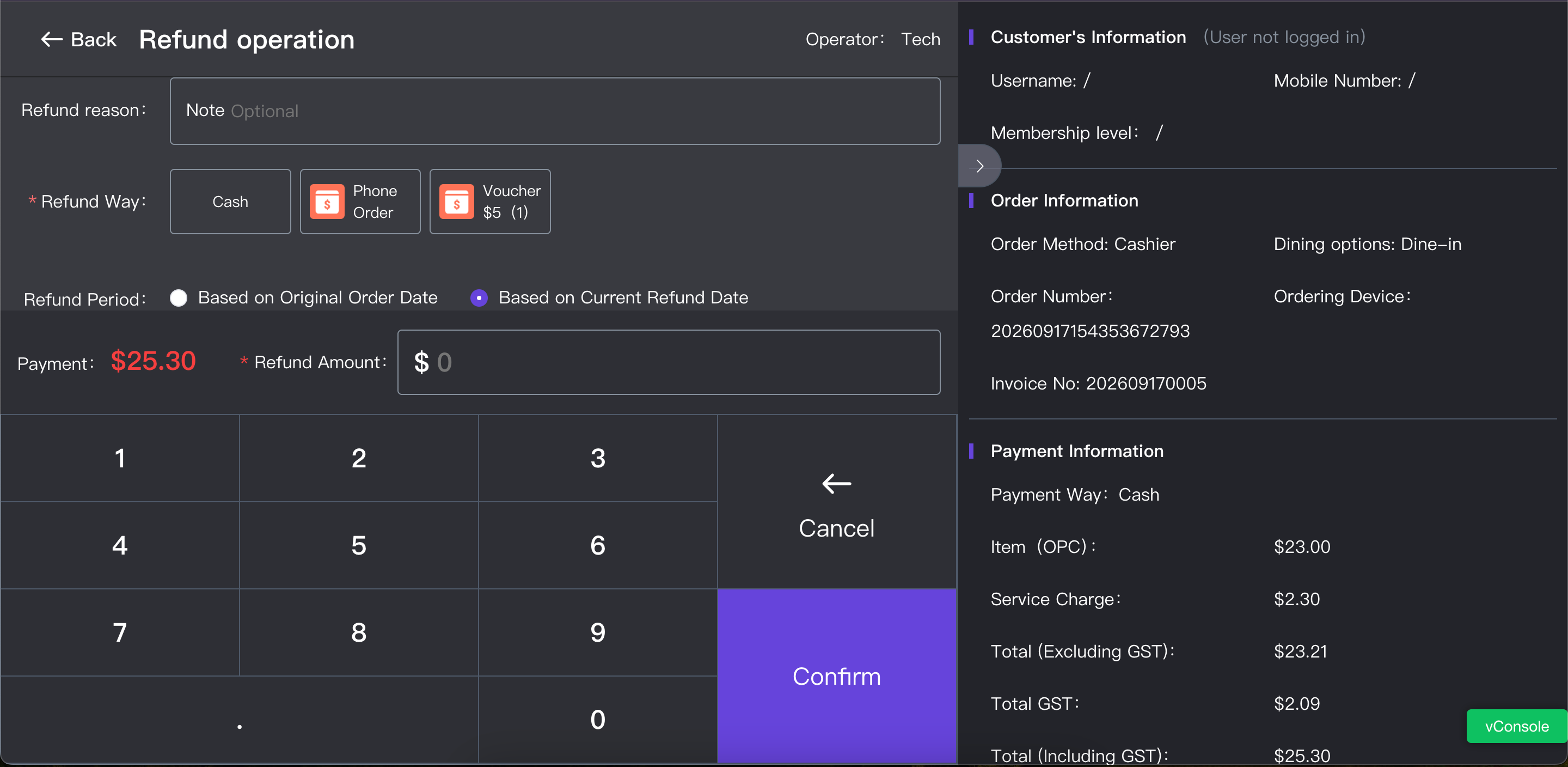 如果选择现金退款,退款金额和对应订单会自动记录到 `Cash Management`,并同步到报表中。 If Cash is selected, the refunded amount and the related order will be recorded automatically in `Cash Management` and included in the reports. > **重要:** POS 中选择的退款方式必须与顾客实际收到退款的方式一致。 > > **Important:** The refund method selected in the POS must match the method used to return the money to the customer. --- ## 3. 选择退款记录日期 **Selecting the Refund Record Date** `Based on Original Order Date` 会把退款记录计入原订单日期,并相应改变原订单日期或原账期的报表数据。 `Based on Original Order Date` records the refund under the original order date and changes the report data for that date or accounting period. `Based on Current Refund Date` 会把退款记录计入实际退款日期,不会修改原订单日期已经产生的报表数据。 `Based on Current Refund Date` records the refund under the actual refund date without changing the report data already generated for the original order date. ### 选择建议 **Recommended Selection** - 如果原订单所属账期尚未完成对账或关闭,并且财务明确要求把退款计入原销售日期,可以选择 `Based on Original Order Date`。 - 如果原订单所属账期已经完成对账或关闭,应选择 `Based on Current Refund Date`。 - 为减少历史报表发生变化,日常退款建议优先选择 `Based on Current Refund Date`。 - Select `Based on Original Order Date` only when the original accounting period is still open and Finance has confirmed that the refund should be recorded under the original sales date. - Select `Based on Current Refund Date` when the original accounting period has already been reconciled or closed. - For daily operations, `Based on Current Refund Date` is recommended to avoid changing historical reports. --- ## 4. CP 刷卡支付退款 **Refunding a CP Card Payment** ### 顾客接受现金或其他支付方式退款 **Customer Accepts Cash or Another Refund Method** 在 POS 中选择顾客实际接受的退款方式,输入退款金额并完成退款。不需要联系 CS。 Select the refund method accepted by the customer in the POS, enter the refund amount and complete the refund. There is no need to contact CS. ### 顾客要求原路退款,刷卡机尚未结算 **Customer Requests a Refund to the Original Card Before Terminal Settlement** 先在刷卡机上操作原路退款,再在 POS 中完成对应的退款记录。刷卡机退款不会自动同步到 POS,两个操作都必须完成。 Process the refund to the original card on the card terminal, then record the same refund in the POS. Card terminal refunds do not sync automatically to the POS, so both steps must be completed. ### 顾客要求原路退款,刷卡机已经结算 **Customer Requests a Refund to the Original Card After Terminal Settlement** 联系 CS,由 CS 向 AllinPay 申请原路退款,并在 POS 中完成对应的退款记录。AllinPay 会收取手续费,顾客收到的是扣除手续费后的退款金额。 Contact CS so that CS can submit the refund request to AllinPay, and record the same refund in the POS. AllinPay will charge a handling fee, and the customer will receive the refund amount after the fee is deducted. --- ## 5. CNP 在线或扫码支付退款 **Refunding a CNP Online or QR Payment** CNP 付款只支持原路全额退款,不支持部分退款。进入退款页面后,系统会显示原支付金额、手续费和最终退款金额。 CNP payments only support a full refund to the original payment method. Partial refunds are not supported. The refund page shows the original payment amount, handling fee and final refund amount. 1. 核对 `Actual Payment Amount`。 Check the `Actual Payment Amount`. 2. 核对 `Handling Fee` 和 `Final Refund Amount`。 Check the `Handling Fee` and `Final Refund Amount`. 3. 如有需要,填写 `Refund Description`。 Enter a `Refund Description` if needed. 4. 确认顾客已了解手续费后,点击 `Confirm Refund`。 Make sure the customer understands the handling fee, then tap `Confirm Refund`. 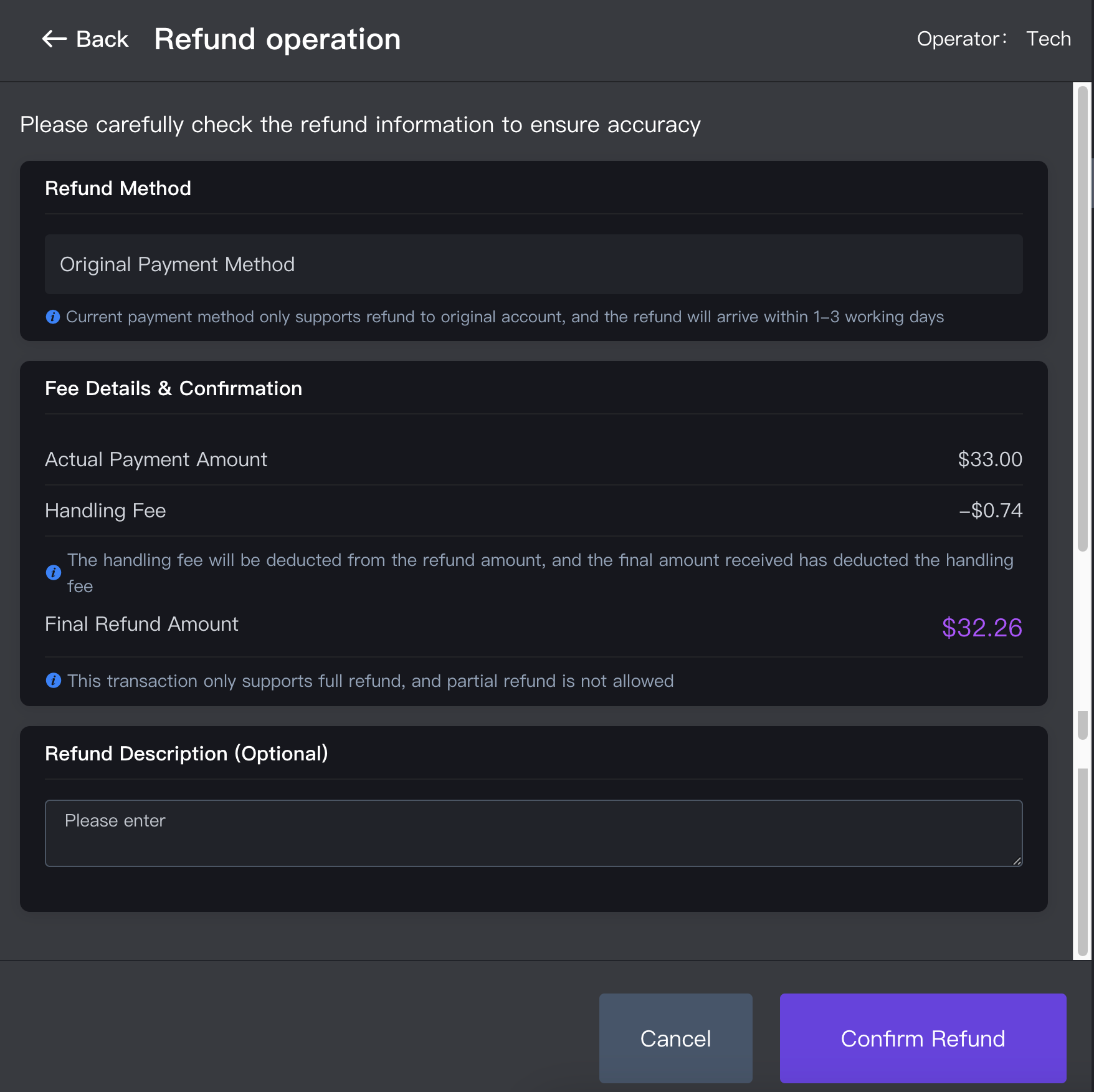 AllinPay 会从退款金额中扣除手续费,顾客实际收到的是页面显示的 `Final Refund Amount`。退款到账时间以页面提示为准。 AllinPay will deduct the handling fee from the refund. The customer will receive the `Final Refund Amount` shown on the screen. Refer to the on-screen message for the refund processing time. --- ## 6. 部分退款的推荐处理方式 **Recommended Process for a Partial Refund** 除 CNP 外,其他支付方式可以在 POS 中输入部分退款金额。但是,系统不能按单个菜品自动计算对应的商品金额、Service Charge 和 GST,员工需要自行计算,容易造成退款金额错误。 Except for CNP payments, other payment methods allow the cashier to enter a partial refund amount. However, the POS cannot automatically calculate the item amount, Service Charge and GST for an individual item. Manual calculation may result in an incorrect refund amount. 为减少计算错误,建议使用以下流程: To reduce calculation errors, use the following process: 1. 先为原订单办理全额退款。 Process a full refund for the original order. 2. 在订单详情中点击 `Return to dine in`。 Tap `Return to dine in` in the order details. 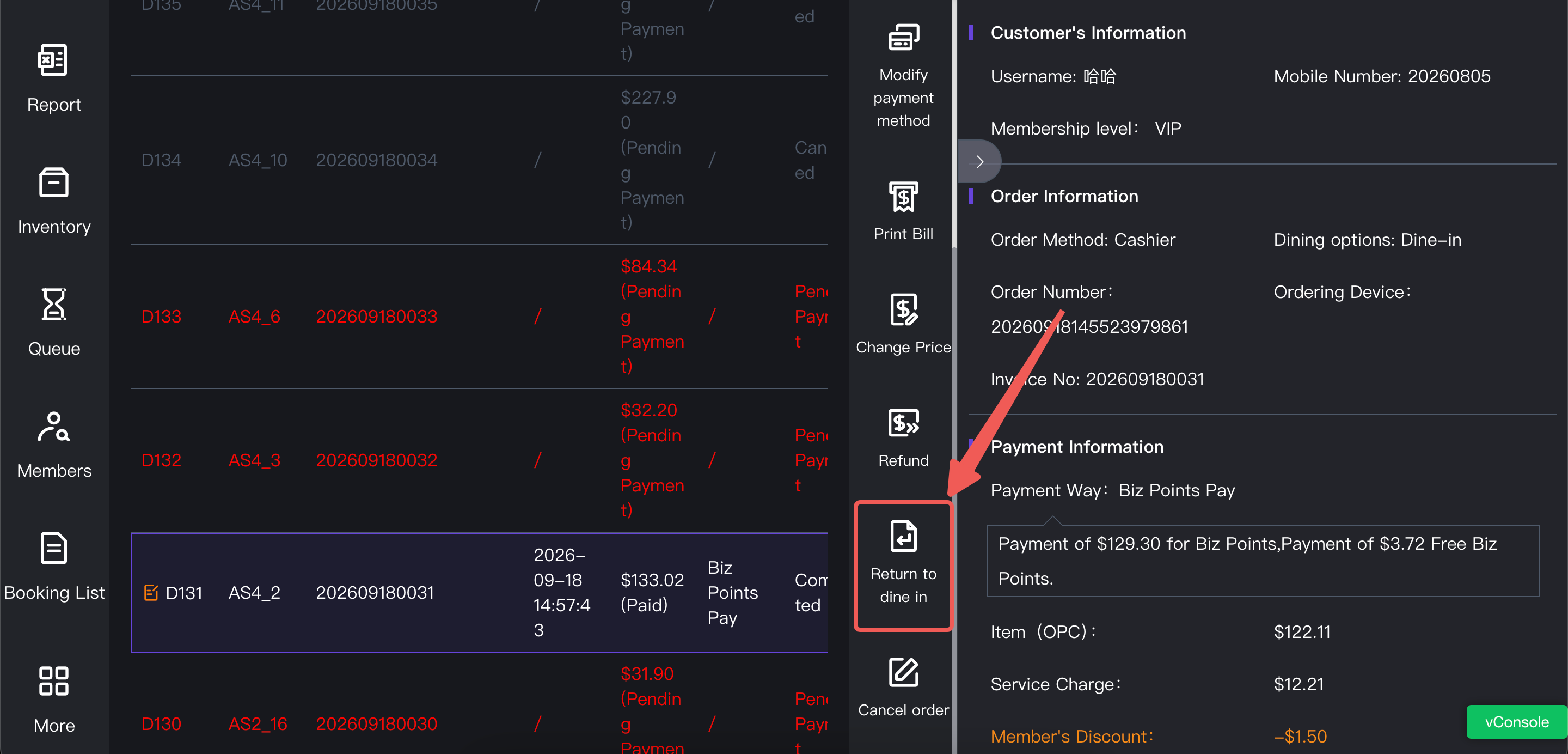 3. 删除或调整需要退款的商品。 Remove or adjust the item that needs to be refunded. 4. 核对新的商品金额、Service Charge、GST 和订单总额。 Check the new item amount, Service Charge, GST and order total. 5. 按照正确的支付方式重新完成付款。 Complete the payment again using the correct payment method. --- ## 7. 不要使用取消、删除或 Cash Out 代替退款 **Do Not Use Cancel, Delete or Cash Out Instead of Refund** 已完成订单虽然可以取消或删除,但不应使用这些操作代替正式退款。CNP 订单取消后可能触发原路退款并产生手续费;CP 订单取消不会同步完成刷卡渠道退款,容易造成 POS 记录与实际资金不一致。 A completed order can be cancelled or deleted, but these actions must not be used instead of the proper refund function. Cancelling a CNP order may trigger a refund to the original payment method and incur a handling fee. Cancelling a CP order does not refund the card transaction and may cause the POS record to differ from the actual fund movement. 不要使用 `Cash Out` 代替订单退款。Cash Out 不能形成规范的订单退款流程,会增加后续对账难度。 Do not use `Cash Out` instead of an order refund. Cash Out does not create a proper order refund record and will make reconciliation more difficult. --- ## 8. 收银员必须记住 **Cashier Checklist** - 退款前先确认原支付方式。 - 实际退款方式必须与 POS 记录一致。 - 刷卡机退款不会自动同步到 POS,必须在 POS 中补充退款记录。 - CNP 只支持原路全额退款,并会扣除手续费。 - 部分商品退款优先使用“全额退款、返回桌台、调整订单、重新付款”的流程。 - 不使用取消、删除或 Cash Out 代替正式退款。 - Check the original payment method before processing a refund. - The actual refund method must match the refund method recorded in the POS. - Card terminal refunds do not sync automatically to the POS. Always record the refund in the POS. - CNP only supports a full refund to the original payment method, and a handling fee will be deducted. - For an item-level refund, use the full refund, return to dine-in, adjust order and repay process. - Do not use Cancel, Delete or Cash Out instead of the proper refund function.
pos
2026年9月20日 10:44
转发文档
收藏文档
上一篇
下一篇
手机扫码
复制链接
手机扫一扫转发分享
复制链接
Markdown文件
PDF文档(打印)
分享
链接
类型
密码
更新密码