后台
1.Menu 商品
1.1 Add Product 添加商品
1.1.1 Product image management 商品图片管理
1.1.2 Main dish as set meal name? 商品名是否进厨房
1.1.3 Members Discount Setting 会员折扣管理
1.2 Batch lmport 批量导入商品
1.3 How to batch operate goods 如何批量操作商品
1.4 sort management 分类管理
1.5 Customized package at the cash register 收银台自定义套餐
1.6 库存管理
1.6.1 快速操作商品库存
1.6.2 如何操作入库
1.6.3 如何操作损耗
1.6.4如何盘点库存
1.6.5 如何查看操作记录
1.7 Purchase Management 采购管理
1.7.1 Supplier Category 供应商管理
1.7.3 Status Setting 状态分类
1.7.4 Add Purchase Order 新增采购单
1.7.4 Edit Purchase Order Status 编辑采购单状态
1.7.5 Check the purchase order 查看采购订单详情
2.Members 会员
2.1 Member management 会员管理
2.1.1 快速查找会员
2.1.2 编辑用户信息
2.1.3 商业积分/消费积分修改
2.1.4 会员详情
2.2 Level management 等级管理
2.2.1 Buy a Membership Through a Recharge Package|购买充值套餐后自动升级会员
2.2.2 Upgrade, Maintain and Downgrade Through Continuous Spending|持续消费升级、保级与降级
2.3消费积分管理
2.3.1 Adjusted points Settings 消费积分设置
2.3.2 消费积分获取和抵扣
2.3.3 Points validity perio 积分有效期
2.4 商业积分明细
2.4.1 充值设置
2.4.2 充值套餐
3. Statistics 统计
3.2 Members 会员统计
3.1 Sales 销售统计
4. Finance 财务
4.1 Details 资产总览
4.2 Deposit List 押金列表
4.3 SMS Balance 短信余额
4.4.1 SMS recharge 短信充值
4.4.2 Usage Record 使用记录
4.4.3 Topup Record 充值记录
4.4 GST Statistics GST统计
4.5 Recharge statistics 充值统计
4.6 ENT
4.6.1 Transaction Details 交易明细
4.6.2 Personnel Details 人员明细
4.7 钱箱日志
4.8 出入库
4.8.1 Stock Out Statistics
4.8.2 Stock In Statistics 入库统计
5.Plug-ins 插件
Cashier Desk 收银台
1. Cashier 收银员
2. Basic settings 基础设置
3. Function Setting 功能设置
4. POS Cashier POS收银端
KIOSK 自助点餐机
Settings 设置
graphics List 广告图列表
Android System 安卓系统
Delivery Service 外卖配送
Product maps 商品映射
Promotion Voucher Personalized Link 专属优惠券链接
Selling vouchers on TikTok TikTok卖券
Receive Promotion Voucher 领取优惠券
TikTok food reviewer TikTok 探店达人
如何配置AI老客户召回
1. 选择发送方式
2. 怎么配置后台参数
3.常见问题
AI加购推荐
1.人工推荐设置
2.智能推荐设置
3.加购设置
4.常见问题
PR Marketing/PR Guest-Bringing 营销/公关带客
PR settings PR设置
cashier desk open PR 收银台开启PR入口
View customer data 查看带客数据
Coupon not available time 优惠券不可用时间
Sync the coupon unusable time 同步优惠券不可使用时间
Double points configuration 翻倍积分
Account/权限
Role management 角色管理
Administrator 管理员列表
Amfuture integrates with Xero Amfuture对接Xero
How to Authorize Xero 如何授权Xero
How to declare GST 如何申报GST
Frequently Asked Questions (FAQ) 常见问题
常见问题
Create an Open item 制作Open item
Change the product picture 更换商品图片
Kds调整成先吃后付
Adjust the language of the receipt 调整小票语言
Product additive configuration 商品加料配置
1.Basic setting 基础设置
2.Frequently asked questions常见问题
3.Common cases 常见案例
4. The product is simultaneously added with other ingredients 商品同步成其他加料
Apply change to selection 批量同步商品加料
Deliver model 外卖模式
Manual Entry of Delivery Orders 手动输入外卖订单
Grab Delivery System Integration Grab 平台系统对接
Delivery Service 商家自配送外卖
Amfuture MCP 对接与 Skills 安装指南(对话式 · 一键复制版)
1. 登录与首页
-
+
首页
2.2.2 Upgrade, Maintain and Downgrade Through Continuous Spending|持续消费升级、保级与降级
> 💡 This guide explains how members earn XP through spending, automatically upgrade after reaching a tier threshold, and maintain or lose their tier through periodic XP decay. > > 本指南说明会员如何通过消费获得 XP,在达到等级门槛后自动升级,并通过定期成长值衰减实现保级或降级。 --- ## 1. When to Use This Setup|适用场景 Use this setup when members must continue spending to upgrade and maintain their membership tier. Members earn XP from eligible order payments and can automatically upgrade when their XP reaches a tier threshold. At each maintenance date, the system deducts XP and recalculates the membership tier based on the remaining XP. 适用于会员需要持续消费才能升级并保持当前会员等级的场景。会员通过符合条件的订单支付获得 XP,达到等级门槛后可以自动升级;到达维护日期时,系统会扣减 XP,并根据剩余 XP 重新判断会员等级。 This guide applies to merchants using the new Membership Growth System. 本指南适用于已经启用新版会员成长体系的商户。 --- ## 2. How the Complete Process Works|完整运行流程 The complete membership growth process contains four steps: 1. The member completes an eligible payment and earns XP according to the configured **Consumption Conversion Ratio**. 2. When the member’s XP reaches a tier’s **Growth Threshold**, the system checks whether that tier allows automatic upgrades. 3. If automatic upgrade is enabled, the member automatically enters the corresponding tier. 4. If **Periodic Decay Rule** is enabled for the member’s current tier, the system deducts XP at the configured maintenance time and recalculates the membership tier using the remaining XP. 完整的会员成长流程包括四个步骤: 1. 会员完成符合条件的支付,并按照设置的**消费转换比例**获得 XP。 2. 当会员的 XP 达到某个等级的**成长值门槛**时,系统会检查该等级是否允许自动升级。 3. 如果已经开启自动升级,会员会自动进入相应等级。 4. 如果会员当前等级开启了**定期衰减规则**,系统会在设定的维护时间扣减 XP,并根据剩余 XP 重新判断会员等级。 > ⚠️ **Automatic Upgrade and Periodic Decay Rule are separate settings.** Automatic Upgrade only controls whether a member can automatically enter a tier. It does not prevent the member from being downgraded. Whether a member participates in scheduled XP decay is determined by the Periodic Decay Rule of the member’s current tier. > > ⚠️ **自动升级和定期衰减规则是两个独立设置。** 自动升级只控制会员能否自动进入某个等级,不控制会员是否会发生降级。会员是否参与定期成长值衰减,由会员当前等级的定期衰减规则决定。 --- ## 3. Step 1: Select the Growth Value Decay Maintenance Period|第一步:选择成长值衰减维护周期 Go to **Membership → Tier Management → Global Settings**. The **Growth Value Decay Maintenance Period** determines when periodic XP decay is performed for all tiers that have Periodic Decay Rule enabled. 进入 **Membership → Tier Management → Global Settings(会员 → 等级管理 → 全局设置)**。**成长值衰减维护周期**决定所有已经开启定期衰减规则的会员等级在什么时间执行 XP 扣减。 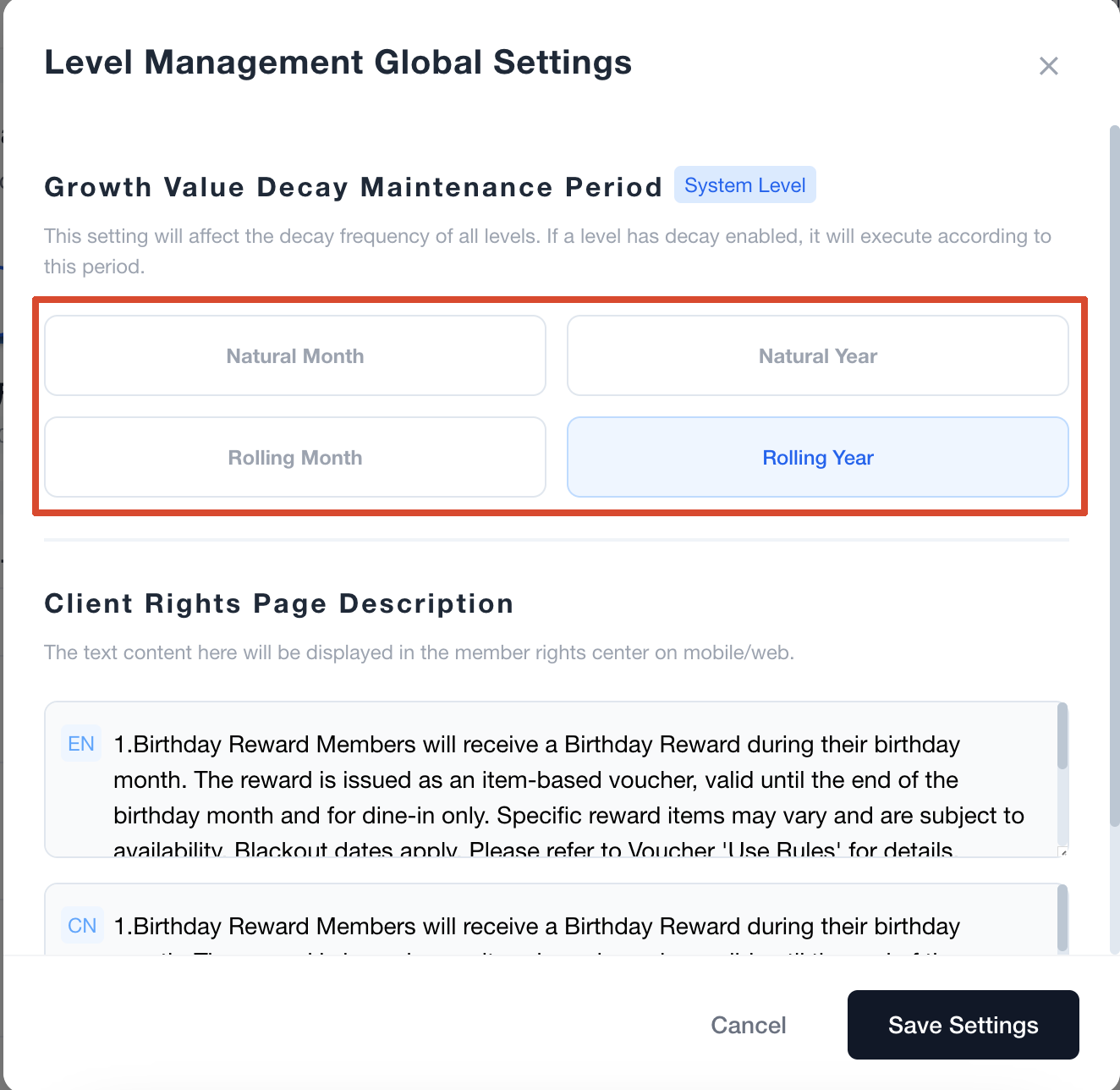 | Maintenance Period|维护周期 | Execution Rule|执行规则 | New Upgrade Protection|新升级保护 | |---|---|---| | Natural Month|自然月 | Runs on the first day of every month.|每月1日执行。 | Supported|支持 | | Natural Year|自然年 | Runs on January 1 every year.|每年1月1日执行。 | Supported|支持 | | Rolling Month|滚动月 | Calculated monthly from the time the member upgraded to the current tier.|按照会员升级到当前等级的时间,每月计算。 | Not supported|不支持 | | Rolling Year|滚动年 | Calculated yearly from the time the member upgraded to the current tier.|按照会员升级到当前等级的时间,每年计算。 | Not supported|不支持 | ### Natural Month and Natural Year|自然月与自然年 Natural periods use the same maintenance date for all eligible members. Natural Month performs XP decay on the first day of every month, while Natural Year performs XP decay on January 1 every year. When either Natural Month or Natural Year is selected, the **New Upgrade Protection** setting is displayed. 自然周期会在统一日期对符合条件的会员执行衰减。自然月在每月1日执行成长值衰减,自然年在每年1月1日执行成长值衰减。选择自然月或自然年后,系统会显示**新升级保护**设置。 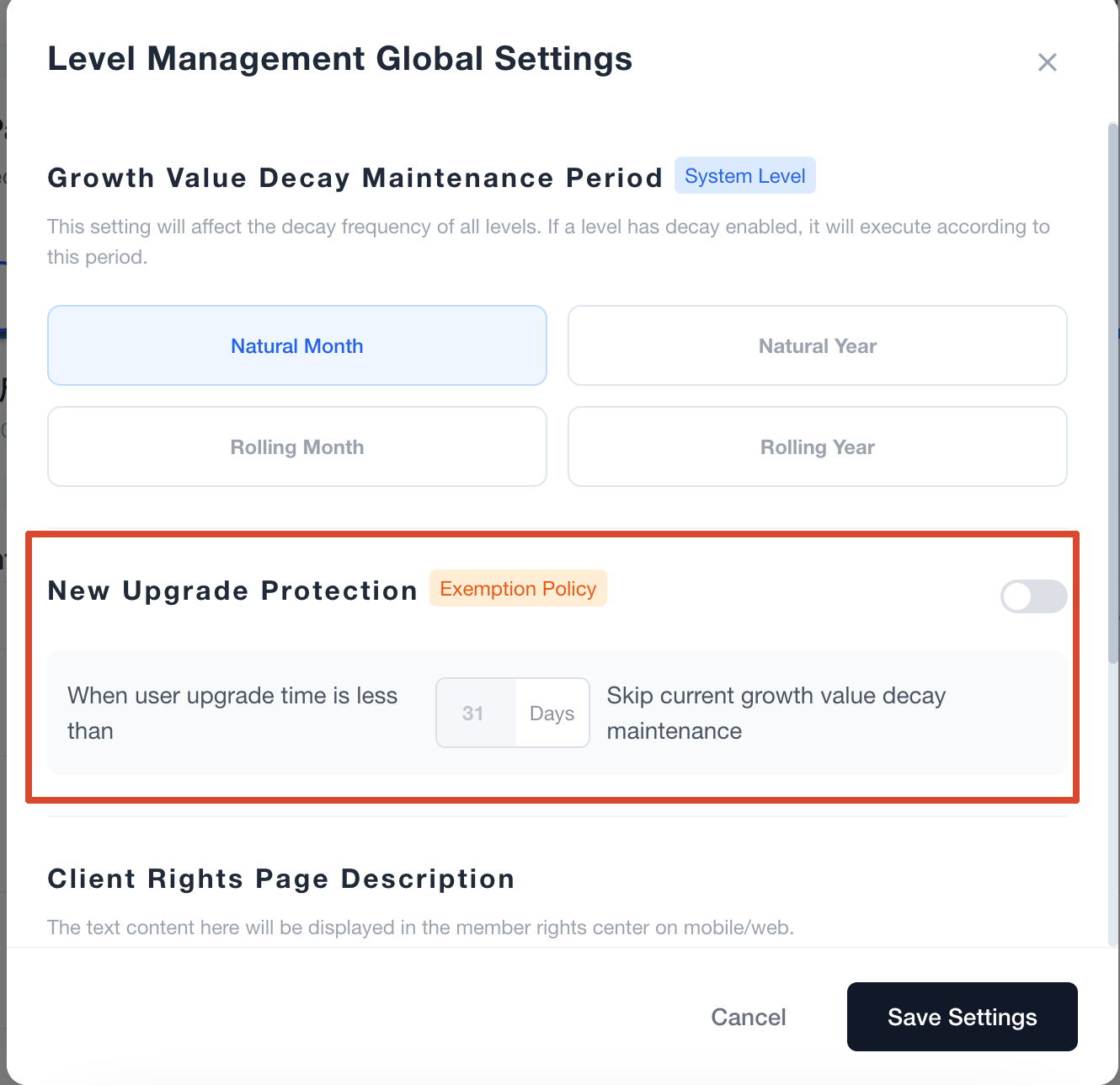 ### Rolling Month and Rolling Year|滚动月与滚动年 Rolling periods are calculated separately for each member based on the time the member upgraded to the current tier. For example, if a member upgrades to Gold on March 15, the first Rolling Month maintenance date is April 15, while the first Rolling Year maintenance date is March 15 of the following year. New Upgrade Protection is not displayed for rolling periods because the maintenance date already follows the member’s tier upgrade time. 滚动周期会根据每位会员升级到当前等级的时间单独计算。例如,会员在3月15日升级为 Gold,滚动月的首次维护日期为4月15日,滚动年的首次维护日期为次年3月15日。滚动周期不会显示新升级保护,因为维护日期本身已经按照会员升级到当前等级的时间计算。 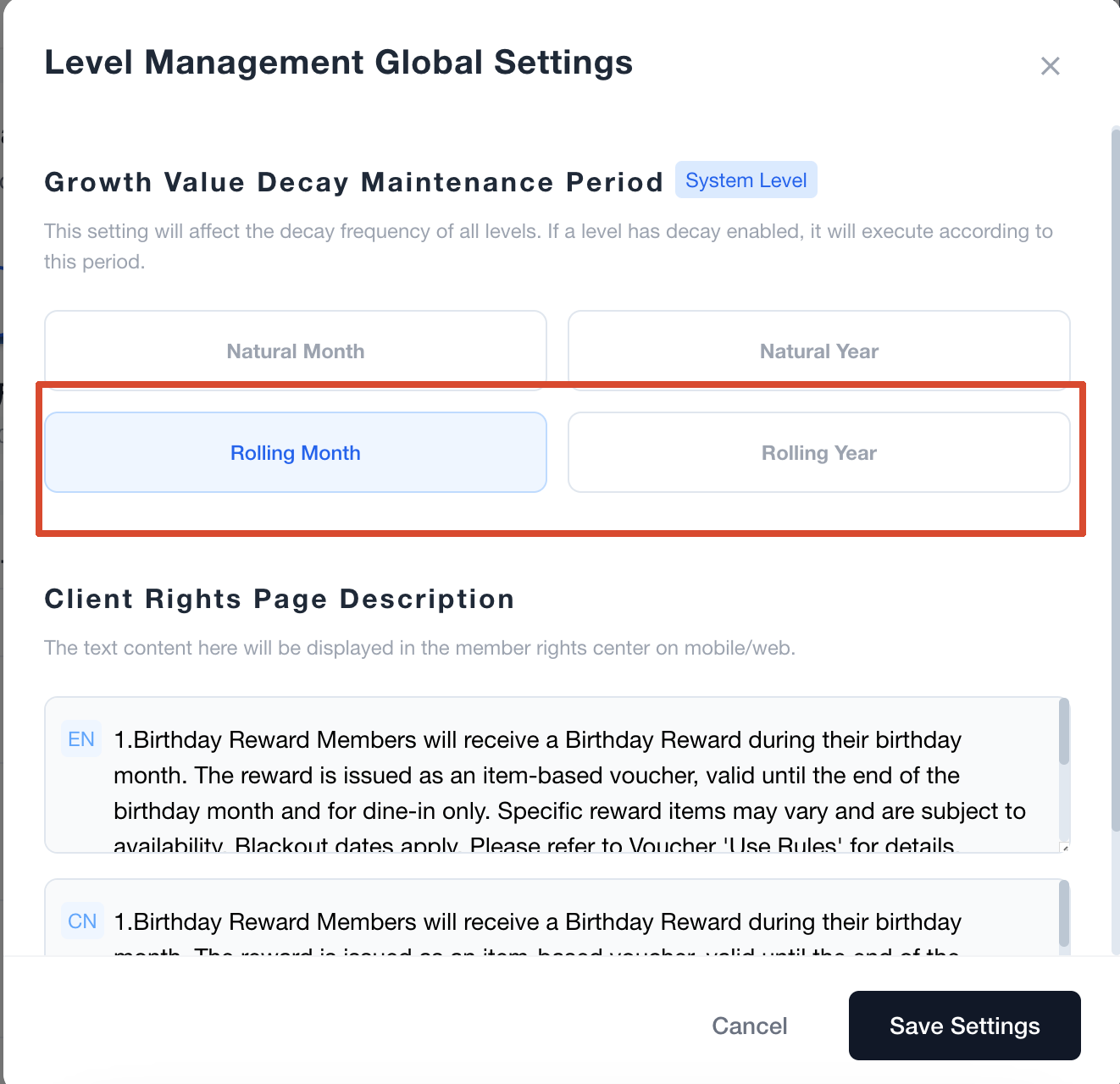 --- ## 4. New Upgrade Protection|新升级保护 New Upgrade Protection is available only when Natural Month or Natural Year is selected. The protection period is calculated from the time the member upgraded to the current tier. If the member is still within the configured protection period on the maintenance date, the member skips that occurrence of XP decay. The system checks the protection condition again at every later maintenance date. 新升级保护只会在选择自然月或自然年时出现。保护期按照会员升级到当前等级的时间计算。如果到达维护日期时,会员升级到当前等级的时间仍处于设定的保护期内,该会员会跳过本次成长值衰减。后续每次到达维护日期时,系统都会重新判断会员是否仍满足保护条件。 ### Protection Example|保护示例 Assume the system uses Natural Month and the New Upgrade Protection period is set to 31 days. A member upgrades to Gold on March 20. The next maintenance date is April 1, which is 12 days after the upgrade, so the member is still protected and skips the April 1 decay. At the next maintenance date on May 1, 42 days have passed since the upgrade. The member is no longer protected and will participate in decay if Periodic Decay Rule is still enabled for Gold. 假设系统使用自然月,并将新升级保护期设置为31天。某位会员在3月20日升级为 Gold,下一个维护日期是4月1日,距离升级时间为12天,因此会员仍处于保护期内,会跳过4月1日的衰减。到达下一次维护日期5月1日时,距离升级已经过去42天,会员已不在保护期内;如果 Gold 仍开启定期衰减规则,则会正常参与衰减。 --- ## 5. Step 2: Configure Each Membership Tier|第二步:设置各个会员等级 Go to **Membership → Tier Management** and create a new membership tier or edit an existing tier. Configure the tier name, Growth Threshold, Consumption Conversion Ratio, automatic upgrade, Periodic Decay Rule and member benefits according to the membership programme. 进入 **Membership → Tier Management(会员 → 等级管理)**,新增会员等级或编辑已有等级。根据会员方案设置等级名称、成长值门槛、消费转换比例、自动升级、定期衰减规则及会员权益。 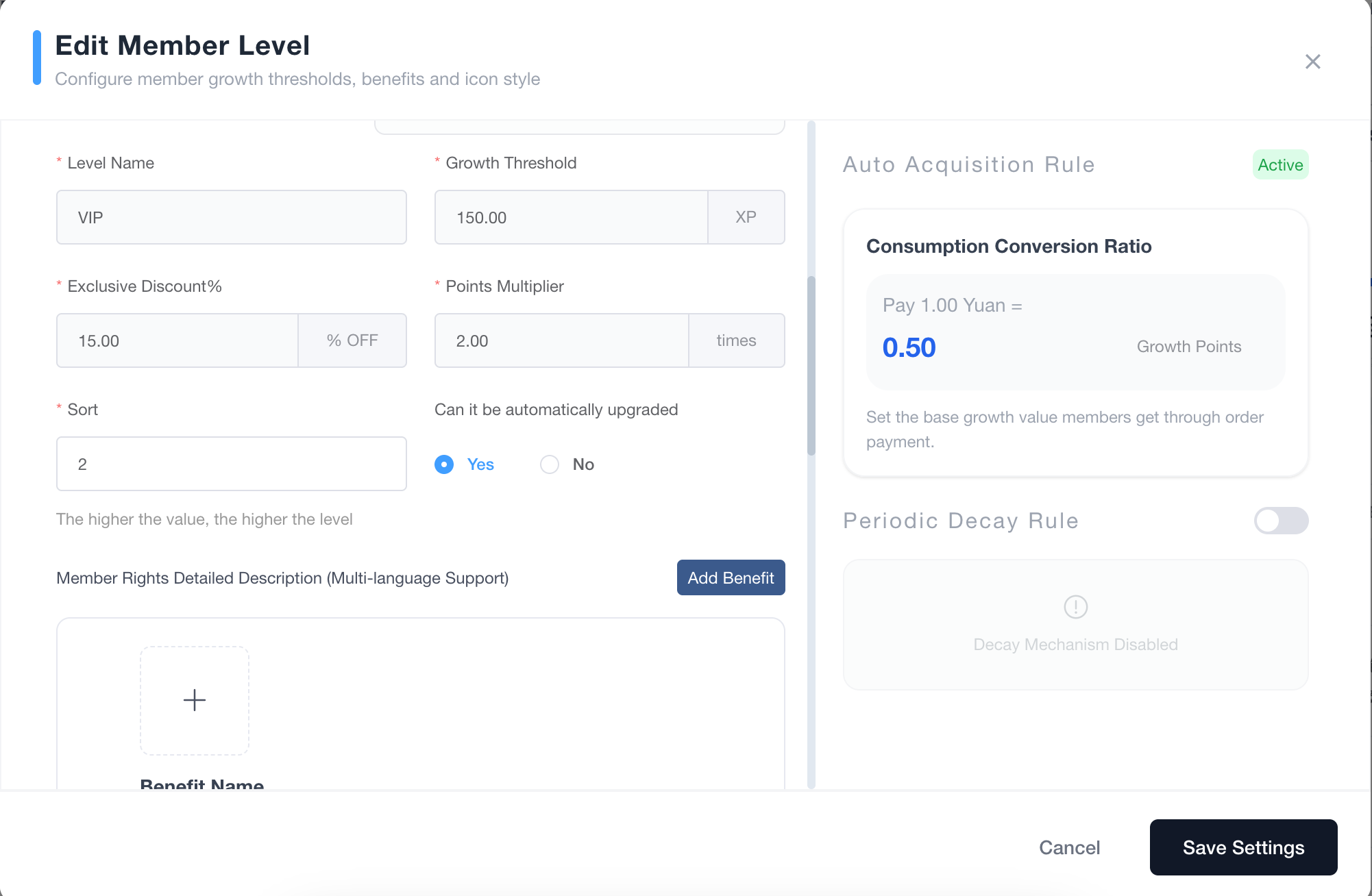 | UI Setting|界面设置项 | How to Configure|设置方式 | |---|---| | Level Name|等级名称 | Enter the name displayed to members.|填写展示给会员的等级名称。 | | Growth Threshold|成长值门槛 | Set the XP required to enter this tier.|设置进入该等级所需的 XP。 | | Consumption Conversion Ratio|消费转换比例 | Set how much XP members earn from eligible order payments.|设置会员完成符合条件的订单支付后可以获得多少 XP。 | | Can it be automatically upgraded|是否可以自动升级 | Select **Yes** if members should automatically enter this tier after reaching its threshold.|如果会员达到门槛后需要自动进入该等级,请选择**是**。 | | Periodic Decay Rule|定期衰减规则 | Enable it if members must continue earning XP to maintain this tier.|如果会员需要持续获得 XP 才能保持该等级,请开启衰减。 | | Calculation Method|计算方式 | Select **Fixed Points** or **Current Ratio**.|选择**固定点数**或**当前比例**。 | | Deduction Intensity|扣除强度 | Enter the XP amount or percentage deducted on each maintenance date.|填写每次维护时扣除的 XP 数量或比例。 | | Member Rights Detailed Description|会员权益详细说明 | Enter the benefits and descriptions displayed to members.|填写展示给会员的等级权益及说明。 | --- ## 6. Step 3: Configure the Consumption Conversion Ratio|第三步:设置消费转换比例 The **Consumption Conversion Ratio** determines how much XP a member earns from eligible order payments. For example, if the setting is **Pay S$1.00 = Earn 1 XP**, a member who completes an eligible payment of S$100 earns 100 XP. Different membership tiers can use different conversion ratios when required by the membership programme. **消费转换比例**决定会员完成符合条件的订单支付后可以获得多少 XP。例如,设置为**支付 S$1.00=获得 1 XP**时,会员完成一笔符合条件的 S$100 支付后,可以获得 100 XP。如业务需要,不同会员等级可以设置不同的消费转换比例。 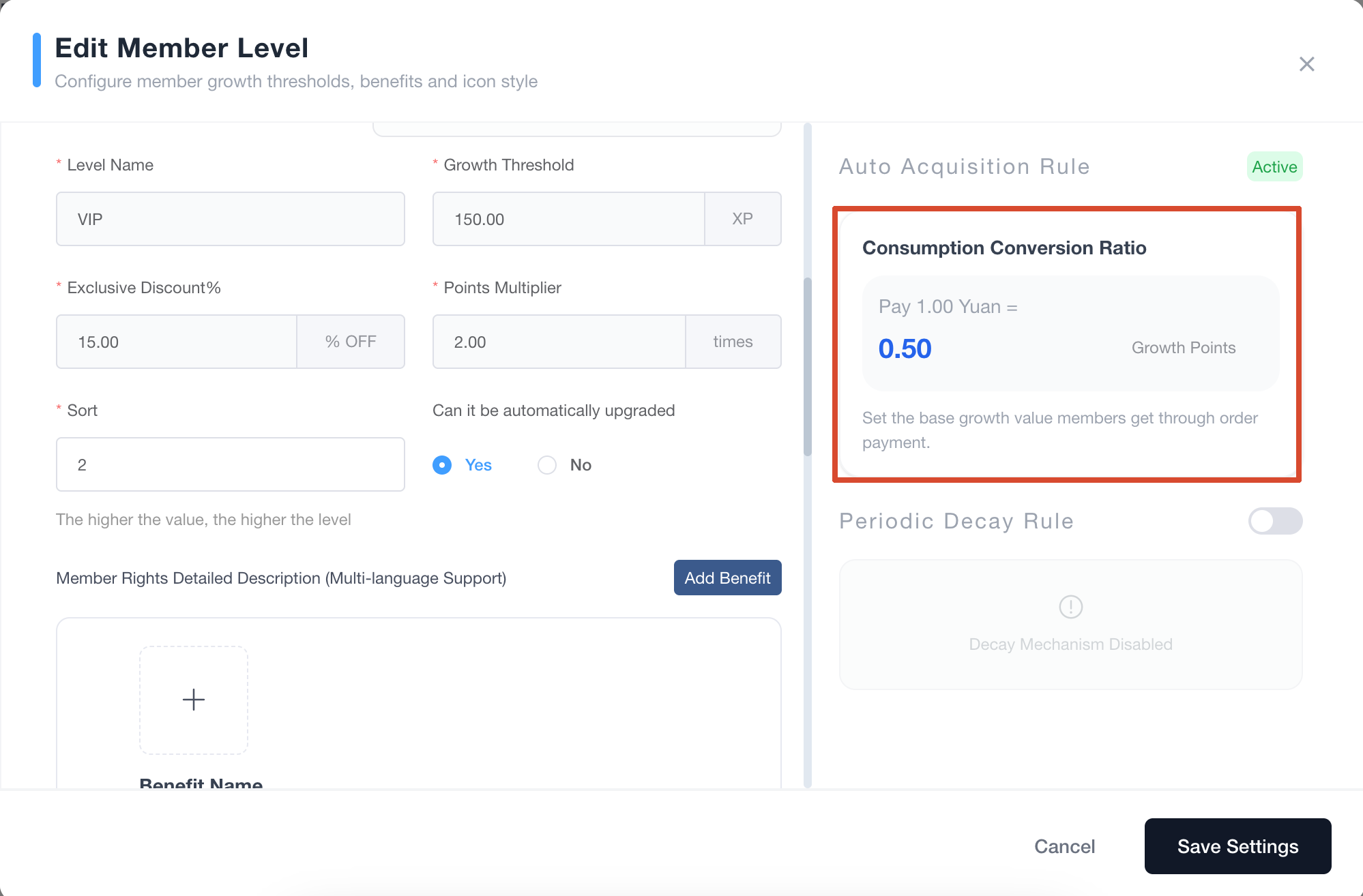 The Points Multiplier affects reward points and does not affect membership XP. XP and Growth Value refer to the same value in this guide. 积分获取倍率影响的是奖励积分,不影响会员成长值。本指南中的 XP 与成长值指同一个数值。 --- ## 7. Step 4: Configure Automatic Upgrade|第四步:设置自动升级 For every tier that members may enter automatically, set **Can it be automatically upgraded** to **Yes**. If this setting is disabled, members will not automatically enter that tier through XP accumulation. This can be used to prevent regular members from automatically entering employee tiers, corporate membership tiers or other contract-based tiers. 对于允许会员自动进入的等级,需要将 **Can it be automatically upgraded(是否可以自动升级)**设置为**是**。如果关闭该设置,会员不会通过累积 XP 自动进入该等级。该设置可以用于避免普通会员自动进入员工等级、公司签约会员等级或其他特殊等级。 > ⚠️ Turning off automatic upgrade does not stop Periodic Decay Rule. If members already in the tier should not be downgraded through scheduled decay, Periodic Decay Rule must also be turned off for that tier. > > ⚠️ 关闭自动升级不会停止定期衰减规则。如果已经处于该等级的会员也不应该因定期衰减而降级,还需要同时关闭该等级的定期衰减规则。 --- ## 8. Step 5: Configure the Periodic Decay Rule|第五步:设置定期衰减规则 Enable **Periodic Decay Rule** for tiers where members must continue earning XP to maintain their status. The execution frequency follows the Growth Value Decay Maintenance Period selected in Global Settings. 对于需要会员持续获得 XP 才能保级的等级,请开启 **Periodic Decay Rule(定期衰减规则)**。衰减的执行频率由全局设置中的成长值衰减维护周期决定。 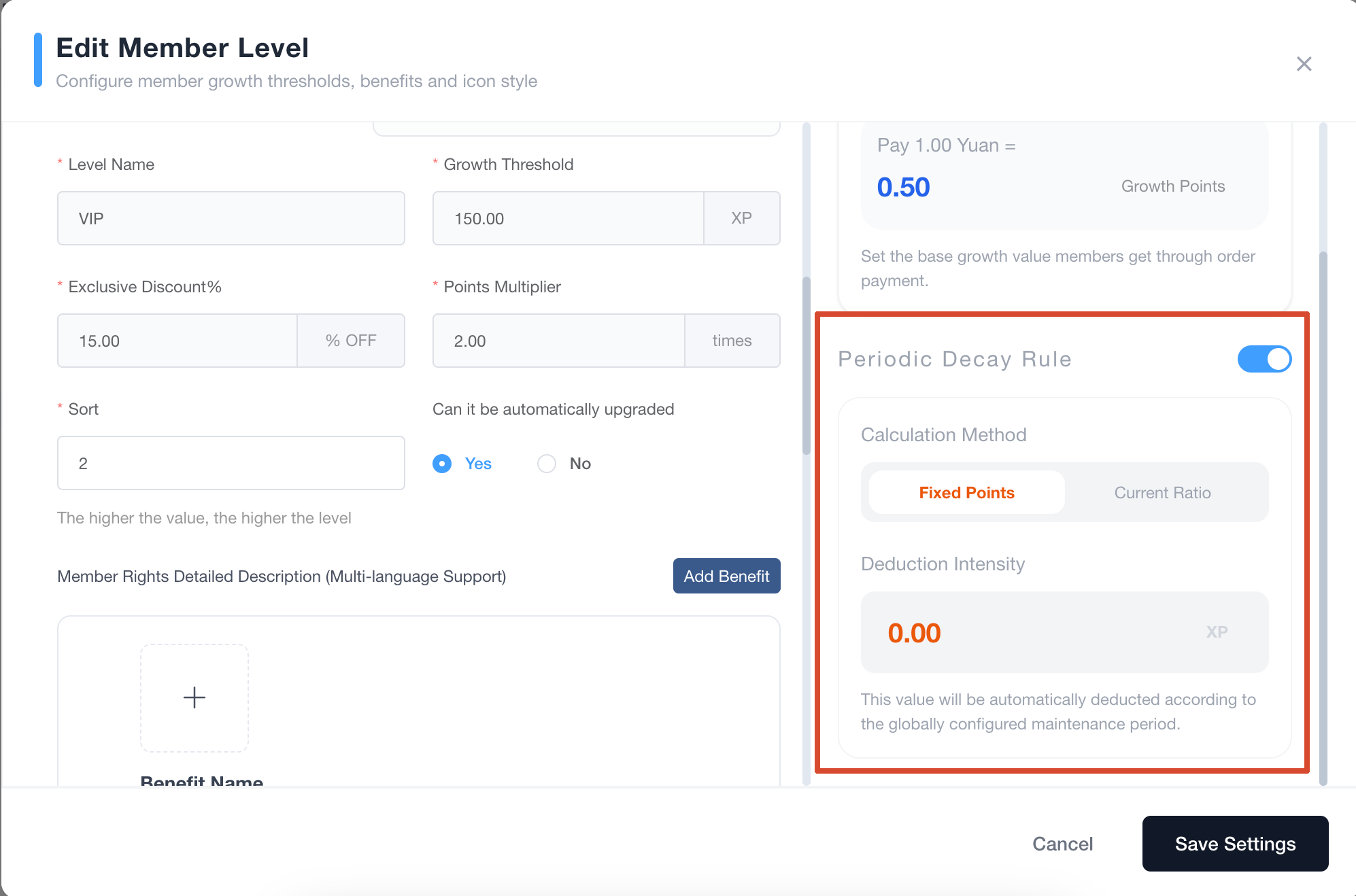 ### Fixed Points|固定点数 When **Fixed Points** is selected, the system deducts a fixed amount of XP on every maintenance date. For example, if a member has 1,200 XP and the Deduction Intensity is 100 XP, the member will have 1,100 XP after decay. 选择 **Fixed Points(固定点数)**后,系统会在每次维护日期扣除固定数量的 XP。例如,会员当前拥有 1,200 XP,扣除强度为 100 XP,衰减后剩余 1,100 XP。 ### Current Ratio|当前比例 When **Current Ratio** is selected, the system deducts a percentage of the member’s current XP on every maintenance date. For example, if a member has 1,000 XP and the Deduction Intensity is 20%, the system deducts 200 XP and leaves the member with 800 XP. 选择 **Current Ratio(当前比例)**后,系统会在每次维护日期按照会员当时拥有的 XP 比例进行扣减。例如,会员当前拥有 1,000 XP,扣除强度为20%,系统会扣除 200 XP,衰减后剩余 800 XP。 --- ## 9. How the System Determines Maintenance or Downgrade|系统如何判断保级或降级 After XP is deducted, the system compares the remaining XP with the membership tier thresholds. If the remaining XP still meets the current tier threshold, the member stays in the current tier. If it falls below the current tier threshold, the member moves to the tier matched by the remaining XP. 成长值扣减完成后,系统会将剩余 XP 与会员等级门槛进行比较。如果剩余 XP 仍然满足当前等级门槛,会员会保持当前等级;如果已经低于当前等级门槛,会员会进入剩余 XP 对应的等级。 ### Complete Example: Upgrade, Maintain and Downgrade|完整示例:升级、保级与降级 Assume the programme uses a Silver threshold of 500 XP and a Gold threshold of 1,000 XP. The Consumption Conversion Ratio is Pay S$1.00 = Earn 1 XP. Gold allows automatic upgrades and uses Rolling Month, Fixed Points and a Deduction Intensity of 100 XP. 假设 Silver 的等级门槛为 500 XP,Gold 的等级门槛为 1,000 XP;消费转换比例为支付 S$1.00 获得 1 XP;Gold 允许自动升级,并使用滚动月、固定点数及 100 XP 的扣除强度。 #### April 1: The Member Upgrades|4月1日:会员升级 The member starts with 600 XP and is in Silver. After completing an eligible payment of S$500, the member earns 500 XP and reaches a total of 1,100 XP. Because the Gold threshold is 1,000 XP and automatic upgrade is enabled, the member upgrades to Gold. 会员原本拥有 600 XP,当前等级为 Silver。完成一笔符合条件的 S$500 支付后,会员获得 500 XP,总 XP 达到 1,100。由于 Gold 门槛为 1,000 XP,并且已经开启自动升级,因此会员升级为 Gold。 #### May 1: The Member Maintains Gold|5月1日:会员成功保级 The first Rolling Month maintenance date is one month after the member upgraded to Gold. The system deducts 100 XP, reducing the balance from 1,100 to 1,000 XP. Because the remaining XP still meets the Gold threshold, the member stays in Gold. 滚动月的首次维护日期为会员升级至 Gold 后的一个月。系统扣除 100 XP,会员的 XP 从 1,100 变为 1,000。由于剩余 XP 仍满足 Gold 门槛,因此会员成功保持 Gold 等级。 #### June 1: The Member Is Downgraded|6月1日:会员发生降级 At the next Rolling Month maintenance date, the system deducts another 100 XP, reducing the balance from 1,000 to 900 XP. The remaining XP no longer meets the Gold threshold but still meets the Silver threshold, so the member is downgraded from Gold to Silver. 到达下一次滚动月维护日期时,系统再次扣除 100 XP,会员的 XP 从 1,000 变为 900。剩余 XP 不再满足 Gold 门槛,但仍满足 Silver 门槛,因此会员从 Gold 降级至 Silver。 This example shows that members must continue earning enough XP between maintenance dates to maintain their current tier. 这个示例说明,会员需要在两次维护日期之间持续获得足够的 XP,才能保持当前等级。 --- ## 10. Recommended Setup for Special Tiers|特殊会员等级建议设置 Some merchants create separate tiers for employees, corporate partners or contracted members. The two settings should be configured separately according to whether regular members may enter the tier and whether existing members may be downgraded. 部分商户会为员工、公司合作方或签约会员创建独立等级。需要分别根据普通会员是否可以进入,以及已经进入的会员是否可以降级,设置自动升级和定期衰减规则。 | Setting Combination|设置组合 | Result|实际效果 | |---|---| | Automatic Upgrade On + Periodic Decay Rule On|自动升级开启+定期衰减开启 | Members can automatically enter the tier and may later be downgraded after XP decay.|会员可以自动进入该等级,后续也可能因 XP 衰减而降级。 | | Automatic Upgrade On + Periodic Decay Rule Off|自动升级开启+定期衰减关闭 | Members can automatically enter the tier but do not participate in scheduled XP decay while in that tier.|会员可以自动进入该等级,处于该等级时不参与定期 XP 衰减。 | | Automatic Upgrade Off + Periodic Decay Rule On|自动升级关闭+定期衰减开启 | Members cannot automatically enter the tier, but existing members still participate in scheduled XP decay.|会员不能自动进入该等级,但已经处于该等级的会员仍会参与定期 XP 衰减。 | | Automatic Upgrade Off + Periodic Decay Rule Off|自动升级关闭+定期衰减关闭 | Members cannot automatically enter the tier and will not be downgraded through scheduled XP decay.|会员不能自动进入该等级,也不会因定期 XP 衰减而降级。 | For employee or corporate membership tiers, turn off both settings when regular members should not enter automatically and assigned members should not be downgraded. 对于员工或公司签约会员等级,如果既不希望普通会员自动进入,也不希望已经进入的会员发生降级,可以同时关闭自动升级和定期衰减规则。 --- ## 11. Tests and Checks Before Launch|上线前测试与检查 ### English Checklist - Confirm that tier names, display order and Growth Thresholds are correct. - Confirm that the Consumption Conversion Ratio matches the membership programme. - Confirm that automatic upgrade is enabled only for tiers that members may enter automatically. - Confirm that Periodic Decay Rule is enabled only for tiers that require continued XP earning. - Confirm that Calculation Method and Deduction Intensity are correct. - Confirm that the correct Natural or Rolling maintenance period is selected. - When using a Natural period, confirm that New Upgrade Protection is configured correctly. - Test a member whose XP remains below the next tier threshold. - Test a member who reaches an automatically upgradeable tier. - Test a decay result where the member maintains the current tier. - Test a decay result where the member is downgraded. - Test a tier that has Periodic Decay Rule disabled. - For employee or corporate tiers, confirm that regular members cannot enter automatically and assigned members will not be unintentionally downgraded. ### 中文检查清单 - 确认等级名称、排序和成长值门槛设置正确。 - 确认消费转换比例符合会员方案。 - 确认只有允许会员自动进入的等级才开启自动升级。 - 确认只有需要持续获得 XP 才能保级的等级才开启定期衰减规则。 - 确认计算方式和扣除强度设置正确。 - 确认已经选择正确的自然周期或滚动周期。 - 使用自然周期时,确认新升级保护设置正确。 - 测试会员 XP 未达到下一等级门槛的情况。 - 测试会员达到允许自动升级的等级门槛的情况。 - 测试衰减后会员保持当前等级的情况。 - 测试衰减后会员发生降级的情况。 - 测试当前等级关闭定期衰减规则的情况。 - 对于员工或公司签约会员等级,确认普通会员不会自动进入,并且已经进入的会员不会意外降级。
pos
2026年9月11日 16:00
转发文档
收藏文档
上一篇
下一篇
手机扫码
复制链接
手机扫一扫转发分享
复制链接
Markdown文件
PDF文档(打印)
分享
链接
类型
密码
更新密码