后台
如何配置AI老客户召回
1. 选择发送方式
1.1 WABA发送
1.2 SMS发送
2. 怎么配置后台参数
2.1 选择召回时间段
2.2 快速筛选加入黑名单
2.3 快速筛选商品不参与召回
2.4 保存修改配置
3.常见问题
AI加购推荐
1.人工推荐设置
1.1添加推荐商品
1.2修改加购商品设置
2.智能推荐设置
2.1快速筛选不参与推荐的商品
3.加购设置
3.1设置推荐加购的条件
3.2推荐加购开关
4.常见问题
4.1加购商品不显示
4.2无法选择自动加购
4.3无法选择商品添加加购
Product additive configuration 商品加料配置
1.Basic setting 基础设置
1.1 Modify the specifications and inventory of the goods 修改商品的规格和库存
1.2 Product attributes 商品属性
1.3 How to set up product filling 怎么设置商品加料
2.Frequently asked questions常见问题
2.1 How to associate existing products 如何关联现有商品
2.2 Modify the display position of small materials 修改小料展示位置
2.3 Select the specified product to display the category 选择指定商品才显示该分类
2.4 Unlimited/Upper Limit/Fixed for a single product 单商品无限/上限/固定限制
2.5 Types and quantities restrictions 种类限制和数量限制
2.6 Implement product specifications through linked products 通过关联商品实现商品规格
2.7 Realize product attributes by associating products 通过关联商品实现商品属性
3.Common cases 常见案例
3.1 Chicken wing type 鸡翅类型
3.2 Package type 套餐类型
3.3 lemon tea 柠檬茶类型
3.4 Braised white chicken set meal 烧白鸡类型
3.5 Coffee-roasted milk tea 咖啡烤奶茶
4. The product is simultaneously added with other ingredients 商品同步成其他加料
1.Menu 商品
1.1 Add Product 添加商品
1.1.1 Product image management 商品图片管理
1.1.2 Main dish as set meal name? 商品名是否进厨房
1.1.3 Members Discount Setting 会员折扣管理
1.2 Batch lmport 批量导入商品
1.3 How to batch operate goods 如何批量操作商品
1.4 sort management 分类管理
1.5 Customized package at the cash register 收银台自定义套餐
常见问题
Create an Open item 制作Open item
Change the product picture 更换商品图片
Kds调整成先吃后付
Adjust the language of the receipt 调整小票语言
2.Members 会员
2.1 Member management 会员管理
2.1.1 快速查找会员
2.1.2 编辑用户信息
2.1.3 商业积分/消费积分修改
2.1.4 会员详情
2.2 Level management 等级管理
Promotion Voucher Personalized Link 专属优惠券链接
How to Create links 如何生成链接
Receive Promotion Voucher 领取优惠券
PR Marketing/PR Guest-Bringing 营销/公关带客
PR settings PR设置
cashier desk open PR 收银台开启PR入口
View customer data 查看带客数据
Apply change to selection 批量同步商品加料
-
+
首页
How to Create links 如何生成链接
**This document mainly describes how to generate coupon links 此篇文档,主要讲解如何生成优惠券链接的操作方法** ## Operation process 操作流程 ### 1. Click Promotion Voucher 点击优惠券 Adjust in 'Background - > Plug-ins - > Promotion Voucher' 在‘后台-->插件-->优惠券’中进行调整  ### 2. Click on Create Link 点击生成链接 Find the coupon you need to generate settings and click on the 'Personalized Link' button 找到需要生成设置的优惠券,点击‘专属链接’按钮 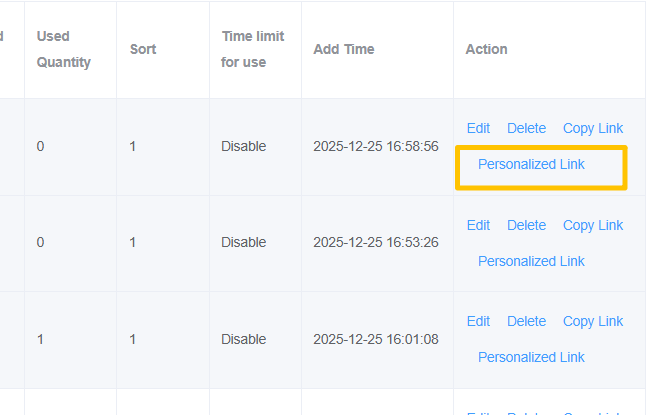 ### 3. Select expiry date 选择有效期 Choose when the link will be valid 选择生成链接的有效时间  ### 4. Click on Claimable 输入可领取数量 Click Enter to generate the amount that the link can claim 点击输入,生成链接可以领取的数量  ### 5. Click on Note 输入备注 Enter the comments of the link,** you can leave it unfilled** 输入该链接的备注,**可以不填**  ### 6. Click on Create and Copy Link Click 'Generate and copy link' to confirm the link to generate the coupon, and once confirmed, it will be automatically copied in the clipboard 点击‘生成并复制链接’确认生成该优惠券的链接,确定后,会自动复制在剪切板中  ## Note 注意: The same link can only be clicked once by the same member, and the number that can be received can be viewed/edited in the coupon settings 同一个链接,同一个会员只能点击一次,可以领取的数量在优惠券设置中进行查看/编辑 
pos
2025年12月26日 09:55
转发文档
收藏文档
上一篇
下一篇
手机扫码
复制链接
手机扫一扫转发分享
复制链接
Markdown文件
PDF文档(打印)
分享
链接
类型
密码
更新密码